
API
Classes
- class scm_molsg.Atom
Bases:
pybind11_objectThis class stores information about individual atoms, including individual atomic environment hashes.
- property bond_groups
This advanced feature provides a list of bonds.
- property environment
A human-readable string representing the local environment used to construct the hash. This string is similar to the SMARTS language.
- property hash
The hash value for a specific atom, including information about its local environment. Note that this value is dependent on settings in an Options class instance provided to the molsg CalcSG class.
- property idx
The molsg index for a specific atom (an integer).
- property neighbors
A list of neighbors, given by the internal molsg atom index.
- property orig_idx
The index for the atom provided in the input (often the same as the molsg index).
- property symbol
A string representing the atomic symbol.
- class scm_molsg.Mol
Bases:
pybind11_objectThis class represents instances of molecules or groups of molecules. It contains information about a molecule as well as containers of its atoms and bonds. The molecule hash can be accessed here.
- property atoms
A list of molsg Atom objects, corresponding to each atom in the molecule.
- property bonds
A list of molsg Bond objects, corresponding to each bond in the molecule.
- get_hash(self: scm_molsg_internal.Mol) None
Calculate hashes for all atoms as well as a single hash for the molecule.
- get_view(self: scm_molsg_internal.Mol) list[int]
Returns the atom indices of atoms contained in the current view.
- property hash
The hash value for the entire molecule. Note that this hash depends on the options chosen for constructing hashes.
- property is_valid
A boolean to indicate whether the molecule could be used to construct hashes. A value of false may indicate input errors.
- property num_atoms
The (integer) number of atoms in the molecule.
- property num_bonds
The (integer) number of bonds in the molecule.
- class scm_molsg.CalcSG
Bases:
pybind11_objectThis class is the main access point for molsg hash calculations.
This is an instance of a hash calculator, and it can be re-used for as many molecules as required. Each hash calculator is initialized with a
molsg.Optionsobject which determines the information the calculator uses to generate the hashes. Users may be interested in using multiple calculators to generate multiple.- Parameters:
Options (
scm_molsg.Options) – (optional) The Options class instance that determines the settings
Example
Let’s initialize a calculator with a
max_depthsetting of 4.import scm_molsg as molsg opt = molsg.Options({"max_depth":4}) calc = molsg.CalcSG(opt)
- calc_sg_hashes(self: scm_molsg_internal.CalcSG, arg0: scm_molsg_internal.Mol) None
Calculates the hashes for a mol using the calculator.
- Parameters:
mol (
scm_molsg.Mol) – the molecule
- class scm_molsg.Options
Bases:
pybind11_objectThis class is used to specify different settings for generating molecular and atomic hashes.
The class can be initialized with a python dictionary containing keywords and values corresponding to the following:
- Keyword Arguments:
max_depth (
int) – a value to specify the maximum depth to traverse when constructing the atomic environments. In other words, this is the largest path length allowed between the central atom and any other atom used to construct the hash of the central atom. A value of -1 indicates that there is no limit on the depth (the entire molecule is considered).implicit_hs (
bool) – whether to include information about neighboring Hs in the hash for every atom. This will change the information included in the hashes for atoms at exactly max_depth distance away from the central atom. Without this argument set to true, the H’s would be one layer too far to be included in the hash.ignore_hs (
bool) – do not consider the hydrogen atoms when constructing the hash, other than as information in atomic valences. Note that no hash values will be returned for any Hydrogen atoms with this option set to true.aromatic (
bool) – Whether to include information in the hash about whether an atom is aromaticring_membership (
bool) – Whether to include the number of rings an atom is part of in the hashsmallest_ring (
bool) – Whether to include information about the smallest ring an atom is part ofenv_strings (
bool) – Whether to additionally construct human-readable descriptions of each atomic environment. These strings should also be usable as SMARTS.atom_stereoRS (
bool) – Whether to include R/S stereochemistry information in the atomic and molecular hashes. Note that this requires input of a 3D geometry or stereogenic SMILES.atom_stereoALL (
bool) – Whether to include additional information to distinguish coordination complexes, surface site geometries, and other differences in geometry.bond_stereoEZ (
bool) – Whether to include information about E/Z bonds in the hash.bond_torsion (
bool) – Whether to include generic torsions in the hash. Note this settings can be used to distinguish rotational conformers.
Example
In this example, we’ll compute the atomic hashes of 3-Aminophenol using a max_depth argument of 1 and 2. These two different options for constructing hashes result in some atoms being marked equivalent for
max_depth=1that will not be equivalent whenmax_depth=2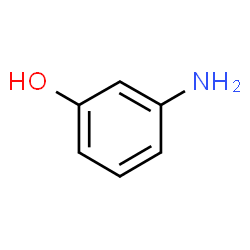
Fig. 1 3-Aminophenol
import scm_molsg as molsg

# make two options instances with differing max_depth arguments
opt1 = molsg.Options({"max_depth":1,'ignore_hs':True})
opt2 = molsg.Options({"max_depth":2, 'ignore_hs':True})

# instantiate two calculators with these two options
calc1 = molsg.CalcSG(opt1)
calc2 = molsg.CalcSG(opt2)

mol = molsg.Input.read_smiles("c1(O)cc(N)ccc1")

print("Calculator 1:")
calc1.calc_sg_hashes(mol)
for atom in mol.atoms:
    if atom.symbol == "H": continue
    print (f"Atom ({atom.symbol}), hash: {atom.hash}")

print("Calculator 2:")
calc2.calc_sg_hashes(mol)
for atom in mol.atoms:
    if atom.symbol == "H": continue
    print (f"Atom ({atom.symbol}), hash: {atom.hash}")
Calculator 1:
Atom (C), hash: 9348233001878490356
Atom (O), hash: 3352425570813969785
Atom (C), hash: 12708908489948740161
Atom (C), hash: 2707277583378347021
Atom (N), hash: 10378244383614633463
Atom (C), hash: 12708908489948740161
Atom (C), hash: 12708908489948740161
Atom (C), hash: 12708908489948740161
Calculator 2:
Atom (C), hash: 9939030674721167915
Atom (O), hash: 9882152943765284397
Atom (C), hash: 1720592189611779214
Atom (C), hash: 3231186285899757061
Atom (N), hash: 10369715150866500786
Atom (C), hash: 13072859615947709232
Atom (C), hash: 3629709972587466969
Atom (C), hash: 12353097390185768048
- get(self: scm_molsg_internal.Options, arg0: str) bool | int
Returns the value of the requested option
- Parameters:
key (
str) – the name of the option to access
Example
opt = molsg.Options()
print(opt.get("max_depth"))
-1
- reset_defaults(self: scm_molsg_internal.Options) None
Resets all the options to their default values.
- set(self: scm_molsg_internal.Options, arg0: str, arg1: bool | int) None
Set one of the options to another value.
- Parameters:
key (
str) – the name of the option to changeval – the new value for the option
Example
opt = molsg.Options()
opt.set("max_depth",3)
- show_options(self: scm_molsg_internal.Options) None
Displays the options keywords, the current values, and the default values. This is a great way to get started with experimenting with the options class.
- scm_molsg.Input
alias of <module ‘scm_molsg_internal.Input’>