
Installation
Starting with AMS2026, Bumblebee is fully integrated into the Amsterdam Modeling Suite (AMS). There is no separate Bumblebee web client anymore. If AMS is installed and you have a license for Bumblebee, you are all set.
For AMS installation details, see the AMS Installation Manual.
Running Bumblebee through the AMS GUI
The recommended workflow is:
Prepare the simulation input in BBinput
Submit and monitor the job in AMSjobs
Analyze the results in BBresults
This replaces the old Bumblebee web interface.
Running on a Remote Queue
Bumblebee simulations typically take quite some time to finish, so running through a remote queue (for example SLURM) is usually preferred. Use AMSjobs queue definitions for remote execution (see AMSjobs documentation).
For Bumblebee, configure the queue so that $options maps directly to the number of SLURM tasks.
A practical run command is:
sbatch -N 1 --ntasks-per-node=$options "$job"
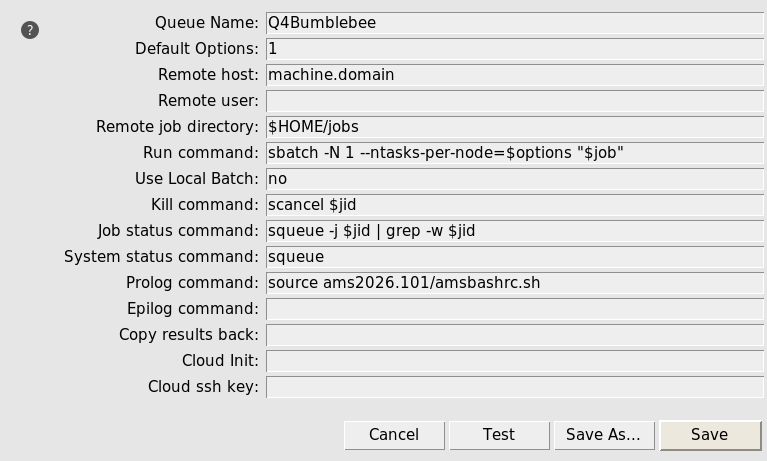
Fig. 1 Example AMSjobs queue definition for Bumblebee on a remote SLURM system
Then set the AMSjobs options field to the total number of trajectories in the job:
No sweep: total trajectories = 1 x number of trajectories per point
Sweep job: total trajectories = number of sweep points x number of trajectories per point
Example:
If a job runs 8 total trajectories, set options to
8
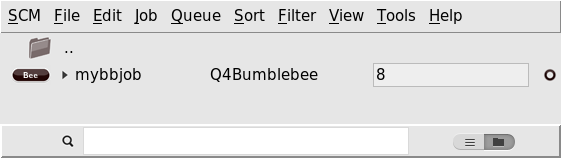
Fig. 2 AMSjobs job list with the Bumblebee queue selected and options=8
This avoids both:
Under-allocation (trajectories wait and run in serial)
Over-allocation (requested tasks stay idle)
Command Line Usage
It is recommended to use the GUI for setting up and managing Bumblebee jobs. For users who run on a remote machine without graphical support or remote connections, a command-line launcher has been made available.
Show available commands:
$AMSBIN/bumblebee -h
Typical usage to run a new job:
$AMSBIN/bumblebee run my_simulation.bee
The run command supports both .bee and YAML input files (.yml/.yaml).
This means that older YAML-based inputs from the pre-AMS2026 Bumblebee web interface are still usable.
FAQ
Do I still need to install Podman and/or the bootstrap scripts?
No. Starting with AMS2026, Bumblebee runs as part of AMS via BBinput, AMSjobs, and BBresults.
Can I still use the materials/simulations created by the old web interface?
Yes. BBinput allows you to load YAML input files created by the pre-2026 web interface. These are then automatically converted to the format used by AMS.
BBresults can be used to visualize output created by the old interface as well. Simply point BBresults to the folder containing the simulation output.
How do I migrate from the web client to AMS?
The web interface contains options to export materials, stacks, parameter sets and simulations. These files can then be loaded by BBinput to re-use them in new simulations.
If you have output data stored on a remote server (which is typically the case with the web interface), you can transfer the files to your local machine for easy visualization with BBresults. The simulation view in the web interface contains a Files tab where you can request downloads.