
GUI, notebook and image output
The ChemicalSystem class provides some convenience functions for integration with the AMS GUI programs, as well as with Jupyter notebooks:
- ChemicalSystem.gui() int
Opens AMSinput to show the ChemicalSystem.
This will block the Python interpreter until the AMSinput process exits. Returns the exit code of the AMSinput process.
Note that atom selections are currently not shown in AMSinput.
- ChemicalSystem.plot(figsize: Tuple[float, float] | None = (4, 4), ax=None, keep_axis: bool = False, **kwargs) None
Shows a ChemicalSystem in a Jupyter notebook.
figsizedetermines the size of the generated figure.axcan be used to place the figure into a Matplotlib subplot object.keep_axisdetermines the visibility of the axes of the plot.
The remaining keyword arguments of this method are forwarded to ASE’s
plot_atomsfunction, see the ASE documentation for details. A useful application of the keyword arguments is rotating the molecule in the plot:mol = ChemicalSystem(...) mol.plot(rotation="50x,40y,30z")
This method relies on ASE and matplotlib for the actual plotting and calling it may throw an ImportError if either of the two packages is can not be found in your Python environment.
Alternatively, you may use the view function from PLAMS:
from scm.plams import view
from scm.base import ChemicalSystem

cs = ChemicalSystem("""
System
  Atoms
    H 0. 0. 0.
    H 0.7 0. 0.
  End
  BondOrders
    1 2 1.0
  End
End
""")

view(cs)  # shows up in a Jupyter notebook
view(cs, picture_path="mystructure.png")  # save to disk
See the view documentation in PLAMS for details.
2D skeletal-formula images
For molecular (non-periodic) systems, the ChemicalSystem can be drawn as a 2D skeletal formula (a
hand-drawn-style structural formula) using RDKit. Use draw_skeletal() to
display it inline in a Jupyter notebook, or write_skeletal_image() to save it to an
SVG or PNG file (the format follows the file extension).
The drawing is derived from the system’s bonds, so the system must contain bonding information; call
guess_bonds() first if it does not. Fresh 2D coordinates are generated for the
depiction, so it does not depend on the 3D geometry of the system. Periodic systems are not supported.
from scm.base import ChemicalSystem

aspirin = ChemicalSystem.from_smiles("CC(=O)Oc1ccccc1C(=O)O")

# Save to a file; the format is deduced from the extension (".svg" or ".png")
aspirin.write_skeletal_image("aspirin.svg")

# In a Jupyter notebook: display inline (SVG by default, or format="png")
aspirin.draw_skeletal()
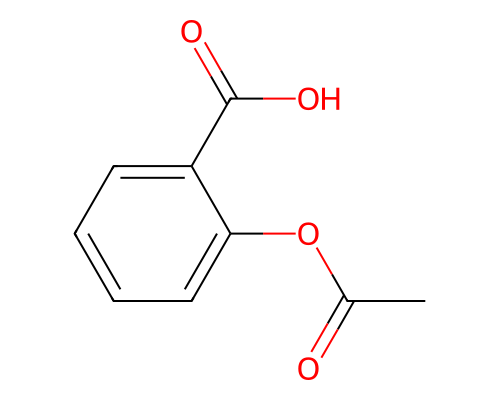
- ChemicalSystem.draw_skeletal(width: int = 500, height: int = 400, *, format: Literal['svg'] = 'svg', transparent_background: bool = False) IPython.display.SVG
- ChemicalSystem.draw_skeletal(width: int = 500, height: int = 400, *, format: Literal['png'], transparent_background: bool = False) IPython.display.Image
Renders a 2D skeletal-formula picture for display in a Jupyter/IPython notebook.
Returns an IPython display object (an
SVGforformat="svg", anImageforformat="png") that renders inline as the last expression in a notebook cell, or viaIPython.display.display(...). Likewrite_skeletal_image(), hydrogens are folded into the heavy atoms and fresh 2D coordinates are generated, so the drawing is a clean skeletal formula independent of the system’s 3D geometry.The molecule is fitted into a
widthxheightbox, and its lines have a fixed width in pixels. For a PNG, this box is the resolution of the image. An SVG can be scaled without loss, but the box still sets its default display size, its aspect ratio, and how bold the lines look: a smaller SVG gets relatively bolder lines.- Parameters:
width – Width of the image in pixels: the resolution of a PNG, the display width of an SVG.
height – Height of the image in pixels: the resolution of a PNG, the display height of an SVG.
format – Either
"svg"(vector, default) or"png"(raster).transparent_background – If
True, render without a background fill.
- Returns:
An
IPython.display.SVGforformat="svg", anIPython.display.Imageforformat="png".
Requires the
IPythonpackage. Raises a ChemicalSystemError for an unsupported format or a periodic system (only non-periodic molecular systems are supported).
- ChemicalSystem.write_skeletal_image(filename: str, width: int = 500, height: int = 400, transparent_background: bool = False) None
Writes a 2D skeletal-formula picture of the molecule to an image file.
The output format is chosen from the
filenameextension:.svg(vector) or.png(raster). Hydrogens are folded into the heavy atoms and fresh 2D coordinates are generated, so the drawing is a clean skeletal formula and does not depend on the system’s 3D geometry.The depiction is built from the system’s bonds, so the ChemicalSystem must contain bonding information for the result to be meaningful. If the bonds are not already defined, call
guess_bonds()first to perceive them from the geometry.The molecule is fitted into a
widthxheightbox, and its lines have a fixed width in pixels. For a PNG, this box is the resolution of the image. An SVG can be scaled without loss, but the box still sets its default display size, its aspect ratio, and how bold the lines look: a smaller SVG gets relatively bolder lines.- Parameters:
filename – Path of the image file to write. Its extension must be
.svgor.png.width – Width of the image in pixels: the resolution of a PNG, the display width of an SVG.
height – Height of the image in pixels: the resolution of a PNG, the display height of an SVG.
transparent_background – If
True, render without a background fill.
Note this may raise a ChemicalSystemError if the extension is unsupported, the system is periodic (only non-periodic molecular systems are supported), or the drawing cannot be created.