
Reaction Discovery with ReaxFF
This example illustrates how to use Reactions Discovery with AMS. See also the Reactions Discovery documentation.
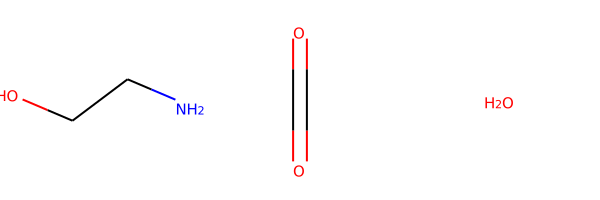
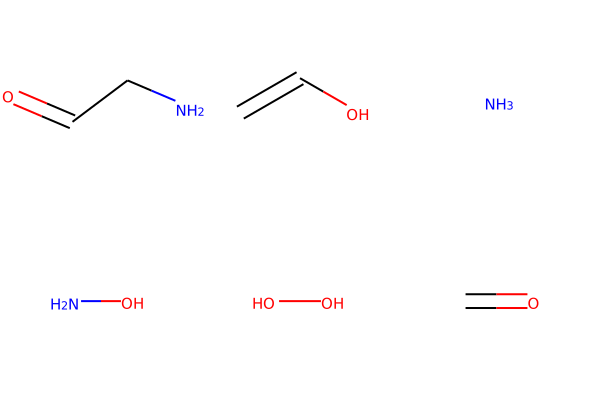
The example asks what products may form from NH2-CH2-CH2-OH + CO2 + H2O and shows how side products such as NH3, NH2-CH2-CH=O, and OH-NH-CH2-CH2-OH can emerge from the exploration.
Because Reactions Discovery starts from random packed configurations, repeated runs will not produce exactly the same set of products.
Initial imports
from typing import List
import scm.plams as plams
from scm.inputs import ReactionsDiscovery, ReaxFF
from scm.reactions_discovery import ReactionsDiscoveryJob
from rdkit import Chem
from rdkit.Chem import Draw

# Settings for displaying molecules in the notebook
from rdkit.Chem.Draw import IPythonConsole

IPythonConsole.ipython_useSVG = True
IPythonConsole.molSize = 250, 250

try:
    from scm.plams import view  # view molecule using AMSview in a Jupyter Notebook in AMS2026+
except ImportError:
    from scm.plams import plot_molecule  # plot molecule in a Jupyter Notebook in AMS2023+

    def view(molecule, **kwargs):
        plot_molecule(molecule)


# this line is not required in AMS2025+
plams.init()
Helpers for showing molecules
def draw_molecules(molecules: List[plams.Molecule]):
    smiles = [molecule.properties.smiles for molecule in molecules]
    return draw_smiles(smiles)


def draw_smiles(smiles: List[str]):
    rd_mols = [Chem.MolFromSmiles(s) for s in smiles]
    return Draw.MolsToGridImage(rd_mols)
The ReactionsDiscoveryJob class
job = ReactionsDiscoveryJob(name="MyDiscovery")
driver = job.input
md = driver.MolecularDynamics
Setting up the reactants for molecular dynamics
md.NumSimulations = 4
build = md.BuildSystem
build.NumAtoms = 250
build.Density = 0.9
Molecule = ReactionsDiscovery.MolecularDynamicsBlock.BuildSystemBlock.MoleculeBlock
build.Molecule = [
    Molecule(SMILES="O", MoleFraction=1),  # Water
    Molecule(SMILES="NCCO", MoleFraction=2),  # MEA
    Molecule(SMILES="O=C=O", MoleFraction=3),  # Carbondioxide
]
draw_smiles([molecule.SMILES for molecule in build.Molecule])
Setting up reactive molecular dynamics
md.Enabled = True
md.Type = "NanoReactor"
reactor = md.NanoReactor
reactor.NumCycles = 10
reactor.Temperature = 500
reactor.MinVolumeFraction = 0.6
Setting up network extraction and ranking
network = driver.NetworkExtraction
network.Enabled = True
network.UseCharges = True
ranking = driver.ProductRanking
ranking.Enabled = True
Selecting the AMS engine to use
engine = ReaxFF()
engine.ForceField = "Glycine.ff"
engine.TaperBO = True  # This is a really important setting for reaction analysis with ReaxFF potentials
driver.Engine = engine
Running reactions discovery
result = job.run()  # start the job
job.check()  # check if job was successful
[13.01|09:49:52] JOB MyDiscovery STARTED
[13.01|09:49:52] JOB MyDiscovery RUNNING
[13.01|10:26:59] JOB MyDiscovery FINISHED
[13.01|10:27:00] Job mdsim_2 reported warnings. Please check the output
[13.01|10:27:00] JOB MyDiscovery SUCCESSFUL
[13.01|10:27:00] Job mdsim_2 reported warnings. Please check the output


True
Obtain the results
graph, molecules, categories = result.get_network()
Categories
The categories are Products Reactants and Unstable, as described in the reactions discovery manual. molecules is a dictionary with keys equal to the categories and each concomitant value is a list of PLAMS molecules.
print(categories)
['Products', 'Reactants', 'Unstable']
draw_molecules(molecules["Reactants"])
Products
These are the side products that reactions discovery found in the order as found by the ranking algorithm.
draw_molecules(molecules["Products"][:6])
Unstable
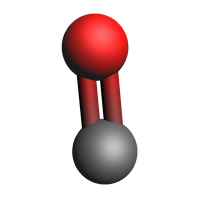
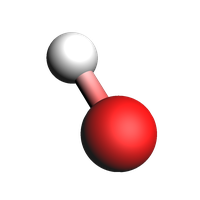
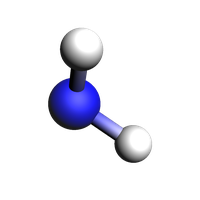
Unstable products were determined to not likely exist outside of reactive dynamics. This e.g. includes radicals or structures that don’t form stable molecules in isolation. Not all unstable molecules have a sensible 2d structure, so instead we plot their 3d structure.
view(molecules["Unstable"][0], width=200, height=200)
view(molecules["Unstable"][1], width=200, height=200)
view(molecules["Unstable"][2], width=200, height=200)
Graph of the reaction network
The graph is a bipartate networkx DiGraph with reaction and molecule nodes. This can be stored on disk in standard graph formats, e.g. .gml
import networkx as nx

nx.write_gml(graph, "reaction_network.gml")
Load a job not originally run by PLAMS
from scm.plams import FileError

try:
    job = ReactionsDiscoveryJob.load_external("plams_workdir/MyDiscovery")
    graph, molecules, categories = job.results.get_network()
except FileError:
    pass
See also
Python Script
#!/usr/bin/env python
# coding: utf-8

# ## Initial imports

from typing import List
import scm.plams as plams
from scm.inputs import ReactionsDiscovery, ReaxFF
from scm.reactions_discovery import ReactionsDiscoveryJob
from rdkit import Chem
from rdkit.Chem import Draw

# Settings for displaying molecules in the notebook
from rdkit.Chem.Draw import IPythonConsole

IPythonConsole.ipython_useSVG = True
IPythonConsole.molSize = 250, 250

try:
    from scm.plams import view  # view molecule using AMSview in a Jupyter Notebook in AMS2026+
except ImportError:
    from scm.plams import plot_molecule  # plot molecule in a Jupyter Notebook in AMS2023+

    def view(molecule, **kwargs):
        plot_molecule(molecule)


# this line is not required in AMS2025+
plams.init()


# ## Helpers for showing molecules

def draw_molecules(molecules: List[plams.Molecule]):
    smiles = [molecule.properties.smiles for molecule in molecules]
    return draw_smiles(smiles)


def draw_smiles(smiles: List[str]):
    rd_mols = [Chem.MolFromSmiles(s) for s in smiles]
    return Draw.MolsToGridImage(rd_mols)


# ## The ReactionsDiscoveryJob class

job = ReactionsDiscoveryJob(name="MyDiscovery")
driver = job.input
md = driver.MolecularDynamics


# ## Setting up the reactants for molecular dynamics

md.NumSimulations = 4
build = md.BuildSystem
build.NumAtoms = 250
build.Density = 0.9
Molecule = ReactionsDiscovery.MolecularDynamicsBlock.BuildSystemBlock.MoleculeBlock
build.Molecule = [
    Molecule(SMILES="O", MoleFraction=1),  # Water
    Molecule(SMILES="NCCO", MoleFraction=2),  # MEA
    Molecule(SMILES="O=C=O", MoleFraction=3),  # Carbondioxide
]
draw_smiles([molecule.SMILES for molecule in build.Molecule])


# ## Setting up reactive molecular dynamics

md.Enabled = True
md.Type = "NanoReactor"
reactor = md.NanoReactor
reactor.NumCycles = 10
reactor.Temperature = 500
reactor.MinVolumeFraction = 0.6


# ## Setting up network extraction and ranking

network = driver.NetworkExtraction
network.Enabled = True
network.UseCharges = True
ranking = driver.ProductRanking
ranking.Enabled = True


# ## Selecting the AMS engine to use

engine = ReaxFF()
engine.ForceField = "Glycine.ff"
engine.TaperBO = True  # This is a really important setting for reaction analysis with ReaxFF potentials
driver.Engine = engine


# ## Running reactions discovery

result = job.run()  # start the job
job.check()  # check if job was successful


# ## Obtain the results

graph, molecules, categories = result.get_network()


# ## Categories
#
# The categories are `Products` `Reactants` and `Unstable`, as described in the reactions discovery manual. `molecules` is a dictionary with keys equal to the categories and each concomitant value is a list of PLAMS molecules.

print(categories)


draw_molecules(molecules["Reactants"])


# ## Products
#
# These are the side products that reactions discovery found in the order as found by the ranking algorithm.

draw_molecules(molecules["Products"][:6])


# ## Unstable
#
# Unstable products were determined to not likely exist outside of reactive dynamics. This e.g. includes radicals or structures that don't form stable molecules in isolation. Not all unstable molecules have a sensible 2d structure, so instead we plot their 3d structure.

view(molecules["Unstable"][0], width=200, height=200, picture_path="picture1.png")


view(molecules["Unstable"][1], width=200, height=200, picture_path="picture2.png")


view(molecules["Unstable"][2], width=200, height=200, picture_path="picture3.png")


# ## Graph of the reaction network
#
# The graph is a bipartate networkx DiGraph with reaction and molecule nodes. This can be stored on disk in standard graph formats, e.g. `.gml`

import networkx as nx

nx.write_gml(graph, "reaction_network.gml")


# ## Load a job not originally run by PLAMS

from scm.plams import FileError

try:
    job = ReactionsDiscoveryJob.load_external("plams_workdir/MyDiscovery")
    graph, molecules, categories = job.results.get_network()
except FileError:
    pass