
Conformer Generation, Rescoring, and Filtering
Generate conformers, reoptimize them at higher levels of theory, and filter the final ensemble to keep only the most relevant structures.
Initial imports
import os
import sys

import matplotlib.pyplot as plt
import numpy as np

from scm.conformers import ConformersJob
from scm.inputs import ADF, Conformers, DFTB, ForceField, GFNFF
from scm.plams import view
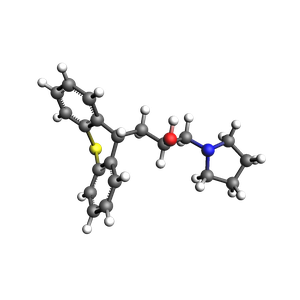
Initial structure
from scm.base import ChemicalSystem

molecule = ChemicalSystem.from_smiles("OC(CC1c2ccccc2Sc2ccccc21)CN1CCCC1")
view(molecule, width=300, height=300, direction="along_pca3")
Generate conformers with RDKit and UFF
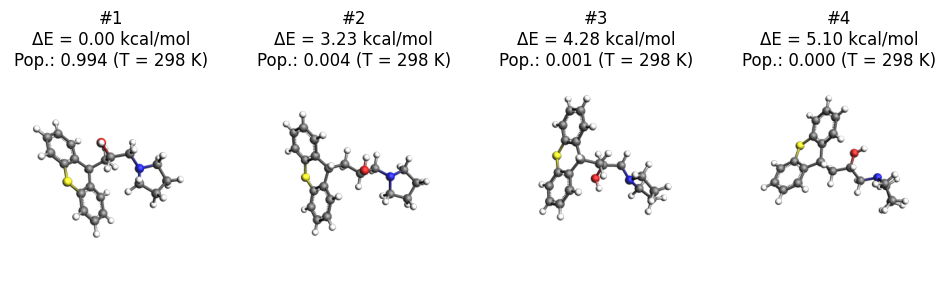
The fastest way to generate conformers is to use RDKit with the UFF force field.
Below we specify to generate 16 initial conformers. The final number of conformers may be smaller, as the geometry optimization may cause several structures to enter the same minimum.
Conformer generation settings
s = Conformers(Task="Generate", Engine=ForceField(Type="UFF"))  # defaults
s.Generator.Method = "RDKit"  # default
s.Generator.RDKit.InitialNConformers = 16  # optional, non-default
Conformer generation input file
print(ConformersJob(settings=s).get_input())
Task Generate
Engine ForceField
    Type UFF
EndEngine
Generator
    Method RDKit
    RDKit
        InitialNConformers 16
    End
End
Run conformer generation
generate_job = ConformersJob(name="generate", molecule=molecule, settings=s)
generate_job.run();
[14.10|15:00:26] JOB generate STARTED
[14.10|15:00:26] JOB generate RUNNING
[14.10|15:01:53] JOB generate FINISHED
[14.10|15:01:53] JOB generate SUCCESSFUL
Conformer generation results
Some helper functions
import pandas as pd


def get_df(job: ConformersJob, temperature=298, unit="kcal/mol") -> pd.DataFrame:
    relative_energies = job.results.get_relative_energies(unit)
    pop = job.results.get_boltzmann_distribution(temperature)
    df = pd.DataFrame(
        {
            "Conformer Id": np.arange(1, len(relative_energies) + 1),
            f"Rel. E ({unit})": relative_energies,
            f"Population at {temperature} K": pop,
        }
    )
    return df
Actual results
Below we see that the conformer generation gave 15 distinct conformers, where the highest-energy conformer is 18 kcal/mol higher in energy than the lowest energy conformer.
You can also see the relative populations of these conformers at the specified temperature. The populations are calculated from the Boltzmann distribution and the relative energies.
unit = "kcal/mol"
temperature = 298
df = get_df(generate_job, temperature, unit)
df
Conformer Id | Rel. E (kcal/mol) | Population at 298 K | |
|---|---|---|---|
0 | 1 | 0.000000 | 9.943598e-01 |
1 | 2 | 3.225354 | 4.287050e-03 |
2 | 3 | 4.281890 | 7.199856e-04 |
3 | 4 | 5.103522 | 1.797884e-04 |
4 | 5 | 5.119932 | 1.748747e-04 |
5 | 6 | 5.525848 | 8.811290e-05 |
6 | 7 | 5.587751 | 7.936731e-05 |
7 | 8 | 5.750010 | 6.034557e-05 |
8 | 9 | 5.869946 | 4.928187e-05 |
9 | 10 | 7.985428 | 1.384369e-06 |
10 | 11 | 10.289655 | 2.827450e-08 |
11 | 12 | 10.632916 | 1.583642e-08 |
12 | 13 | 16.695389 | 5.670320e-13 |
13 | 14 | 20.498977 | 9.207917e-16 |
14 | 15 | 20.789416 | 5.638466e-16 |
from scm.conformers.plams.plot import plot_conformers

axes = plot_conformers(
    generate_job,
    4,
    temperature=temperature,
    unit=unit,
    lowest=True,
    width=300,
    height=300,
    direction="along_pca3",
)
axes;
Re-optimize conformers with GFNFF
The UFF force field is not very accurate for geometries and energies. From an initial conformer set you can reoptimize it with a better level of theory.
The Optimize task performs GeometryOptimization jobs on each conformer in a set.
Below, the most stable conformers (within 8 kcal/mol of the most stable conformer) at the UFF level of theory are re-optimized with GFNFF, which gives more accurate geometries.
s = Conformers(Task="Optimize", Engine=GFNFF())  # or choose a different engine if you don't have a GFNFF license
# must be absolute path
s.InputConformersSet = [os.path.abspath(generate_job.results.rkfpath())]
# only conformers within 8 kcal/mol at the PREVIOUS level of theory
s.InputMaxEnergy = 8.0

reoptimize_job = ConformersJob(settings=s, name="reoptimize")
print(reoptimize_job.get_input())
Task Optimize
InputConformersSet /Users/ormrodmorley/Documents/code/ams/amshome_version_bump/userdoc/PythonExamples/conformers-generation/plams_workdir/generate/conformers.rkf
InputMaxEnergy 8.0
Engine GFNFF
EndEngine
reoptimize_job.run();
[14.10|15:01:57] JOB reoptimize STARTED
[14.10|15:01:57] JOB reoptimize RUNNING
[14.10|15:02:03] JOB reoptimize FINISHED
[14.10|15:02:03] JOB reoptimize SUCCESSFUL
df = get_df(reoptimize_job, temperature=temperature, unit=unit)
df
Conformer Id | Rel. E (kcal/mol) | Population at 298 K | |
|---|---|---|---|
0 | 1 | 0.000000 | 0.613463 |
1 | 2 | 0.670562 | 0.197705 |
2 | 3 | 1.524616 | 0.046739 |
3 | 4 | 1.608052 | 0.040596 |
4 | 5 | 1.666489 | 0.036782 |
5 | 6 | 1.731800 | 0.032941 |
6 | 7 | 1.862871 | 0.026400 |
7 | 8 | 3.021236 | 0.003733 |
8 | 9 | 3.880810 | 0.000874 |
9 | 10 | 3.958223 | 0.000767 |
axes = plot_conformers(reoptimize_job, 4, temperature=temperature, unit=unit, lowest=True)
axes;

Score conformers with DFTB
If you have many conformers or a very large molecule, it can be computationally expensive to do the conformer generation or reoptimization and a high level of theory.
The Score task runs SinglePoint jobs on the conformers in a set. This lets you use a more computationally expensive method. Here, we choose DFTB, although normally you may choose some DFT method.
s = Conformers(Task="Score", Engine=DFTB(Model="GFN1-xTB"))  # or choose a different engine if you don't have a DFTB license
# must be absolute path
s.InputConformersSet = [os.path.abspath(reoptimize_job.results.rkfpath())]
# only conformers within 4 kcal/mol at the PREVIOUS level of theory
s.InputMaxEnergy = 4.0
# s.Engine = ADF()  # to use ADF PBE with Grimme D3(BJ) dispersion
# s.Engine.XC.GGA = "PBE"
# s.Engine.XC.DISPERSION = "GRIMME3 BJDAMP"

score_job = ConformersJob(settings=s, name="score")
score_job.run();
[14.10|15:02:09] JOB score STARTED
[14.10|15:02:09] JOB score RUNNING
[14.10|15:02:13] JOB score FINISHED
[14.10|15:02:13] JOB score SUCCESSFUL
df = get_df(score_job, temperature=temperature, unit=unit)
df
Conformer Id | Rel. E (kcal/mol) | Population at 298 K | |
|---|---|---|---|
0 | 1 | 0.000000 | 0.181083 |
1 | 2 | 0.066256 | 0.161915 |
2 | 3 | 0.099974 | 0.152953 |
3 | 4 | 0.108191 | 0.150846 |
4 | 5 | 0.240768 | 0.120588 |
5 | 6 | 0.596112 | 0.066177 |
6 | 7 | 0.648118 | 0.060613 |
7 | 8 | 0.700378 | 0.055493 |
8 | 9 | 0.922286 | 0.038150 |
9 | 10 | 1.598348 | 0.012181 |
axes = plot_conformers(score_job, 4, temperature=temperature, unit=unit, lowest=True)
axes;

Here, you see that from the conformers in the set, DFTB predicts a different lowest-energy conformer than GFNFF (compare to previous figure).
Filter a conformer set
In practice, you may have generated thousands of conformers for a particular structure. Many of those conformers may be so high in energy that their Boltzmann weights are very small.
The Filter task only filters the conformers, it does not perform any additional calculations. It can be used to reduce a conformer set so that it is more convenient to work with.
Below, we filter the conformers set to only the conformers within 2 kcal/mol of the minimum.
s = Conformers(Task="Filter")
s.InputConformersSet = [os.path.abspath(score_job.results.rkfpath())]
s.InputMaxEnergy = 2.0

filter_job = ConformersJob(settings=s, name="filter")
filter_job.run();
[14.10|15:02:17] JOB filter STARTED
[14.10|15:02:17] JOB filter RUNNING
[14.10|15:02:20] JOB filter FINISHED
[14.10|15:02:20] JOB filter SUCCESSFUL
df = get_df(filter_job, temperature=temperature, unit=unit)
df
Conformer Id | Rel. E (kcal/mol) | Population at 298 K | |
|---|---|---|---|
0 | 1 | 0.000000 | 0.181083 |
1 | 2 | 0.066256 | 0.161915 |
2 | 3 | 0.099974 | 0.152953 |
3 | 4 | 0.108191 | 0.150846 |
4 | 5 | 0.240768 | 0.120588 |
5 | 6 | 0.596112 | 0.066177 |
6 | 7 | 0.648118 | 0.060613 |
7 | 8 | 0.700378 | 0.055493 |
8 | 9 | 0.922286 | 0.038150 |
9 | 10 | 1.598348 | 0.012181 |
axes = plot_conformers(filter_job, 4, temperature=temperature, unit=unit, lowest=True)
axes;

The structures and energies are identical to before. However, the relative populations changed slightly as there are now fewer conformers in the set.
More about conformers
Try CREST instead of RDKit to generate the initial conformer set
The Expand task can be used to expand a set of conformers.
See also
Python Script
#!/usr/bin/env python
# coding: utf-8

# ## Initial imports

import os
import sys

import matplotlib.pyplot as plt
import numpy as np

from scm.conformers import ConformersJob
from scm.inputs import ADF, Conformers, DFTB, ForceField, GFNFF
from scm.plams import view


# ## Initial structure

from scm.base import ChemicalSystem

molecule = ChemicalSystem.from_smiles("OC(CC1c2ccccc2Sc2ccccc21)CN1CCCC1")
view(molecule, width=300, height=300, direction="along_pca3", picture_path="picture1.png")


# ## Generate conformers with RDKit and UFF
# The fastest way to generate conformers is to use RDKit with the UFF force field.
#
# Below we specify to generate 16 initial conformers. The final number of conformers may be smaller, as the geometry optimization may cause several structures to enter the same minimum.

# ### Conformer generation settings

s = Conformers(Task="Generate", Engine=ForceField(Type="UFF"))  # defaults
s.Generator.Method = "RDKit"  # default
s.Generator.RDKit.InitialNConformers = 16  # optional, non-default


# ### Conformer generation input file

print(ConformersJob(settings=s).get_input())


# ### Run conformer generation

generate_job = ConformersJob(name="generate", molecule=molecule, settings=s)
generate_job.run();


# ## Conformer generation results

# ### Some helper functions

import pandas as pd


def get_df(job: ConformersJob, temperature=298, unit="kcal/mol") -> pd.DataFrame:
    relative_energies = job.results.get_relative_energies(unit)
    pop = job.results.get_boltzmann_distribution(temperature)
    df = pd.DataFrame(
        {
            "Conformer Id": np.arange(1, len(relative_energies) + 1),
            f"Rel. E ({unit})": relative_energies,
            f"Population at {temperature} K": pop,
        }
    )
    return df


# ### Actual results
#
# Below we see that the **conformer generation gave 15 distinct conformers**, where the highest-energy conformer is 18 kcal/mol higher in energy than the lowest energy conformer.
#
# You can also see the **relative populations** of these conformers at the specified temperature. The populations are calculated from the **Boltzmann distribution** and the relative energies.

unit = "kcal/mol"
temperature = 298


df = get_df(generate_job, temperature, unit)
print(df)


from scm.conformers.plams.plot import plot_conformers

axes = plot_conformers(
    generate_job,
    4,
    temperature=temperature,
    unit=unit,
    lowest=True,
    width=300,
    height=300,
    direction="along_pca3",
)
axes;
import matplotlib.pyplot as plt
plt.gcf().savefig("picture2.png")


# ## Re-optimize conformers with GFNFF
#
# The UFF force field is not very accurate for geometries and energies. From an initial conformer set you can reoptimize it with a better level of theory.
#
# The **Optimize** task performs **GeometryOptimization** jobs on each conformer in a set.
#
# Below, the most stable conformers (within 8 kcal/mol of the most stable conformer) at the UFF level of theory are re-optimized with GFNFF, which gives more accurate geometries.

s = Conformers(Task="Optimize", Engine=GFNFF())  # or choose a different engine if you don't have a GFNFF license
# must be absolute path
s.InputConformersSet = [os.path.abspath(generate_job.results.rkfpath())]
# only conformers within 8 kcal/mol at the PREVIOUS level of theory
s.InputMaxEnergy = 8.0

reoptimize_job = ConformersJob(settings=s, name="reoptimize")
print(reoptimize_job.get_input())


reoptimize_job.run();


df = get_df(reoptimize_job, temperature=temperature, unit=unit)
print(df)


axes = plot_conformers(reoptimize_job, 4, temperature=temperature, unit=unit, lowest=True)
axes;
import matplotlib.pyplot as plt
plt.gcf().savefig("picture3.png")


# ## Score conformers with DFTB
#
# If you have many conformers or a very large molecule, it can be computationally expensive to do the conformer generation or reoptimization and a high level of theory.
#
# The **Score** task runs **SinglePoint** jobs on the conformers in a set. This lets you use a more computationally expensive method. Here, we choose DFTB, although normally you may choose some DFT method.

s = Conformers(Task="Score", Engine=DFTB(Model="GFN1-xTB"))  # or choose a different engine if you don't have a DFTB license
# must be absolute path
s.InputConformersSet = [os.path.abspath(reoptimize_job.results.rkfpath())]
# only conformers within 4 kcal/mol at the PREVIOUS level of theory
s.InputMaxEnergy = 4.0
# s.Engine = ADF()  # to use ADF PBE with Grimme D3(BJ) dispersion
# s.Engine.XC.GGA = "PBE"
# s.Engine.XC.DISPERSION = "GRIMME3 BJDAMP"

score_job = ConformersJob(settings=s, name="score")
score_job.run();


df = get_df(score_job, temperature=temperature, unit=unit)
print(df)


axes = plot_conformers(score_job, 4, temperature=temperature, unit=unit, lowest=True)
axes;
import matplotlib.pyplot as plt
plt.gcf().savefig("picture4.png")


# Here, you see that from the conformers in the set, **DFTB predicts a different lowest-energy conformer than GFNFF** (compare to previous figure).

# ## Filter a conformer set
#
# In practice, you may have generated thousands of conformers for a particular structure. Many of those conformers may be so high in energy that their Boltzmann weights are very small.
#
# The **Filter** task only filters the conformers, it does not perform any additional calculations. It can be used to reduce a conformer set so that it is more convenient to work with.
#
# Below, we filter the conformers set to only the conformers within 2 kcal/mol of the minimum.

s = Conformers(Task="Filter")
s.InputConformersSet = [os.path.abspath(score_job.results.rkfpath())]
s.InputMaxEnergy = 2.0

filter_job = ConformersJob(settings=s, name="filter")
filter_job.run();


df = get_df(filter_job, temperature=temperature, unit=unit)
print(df)


axes = plot_conformers(filter_job, 4, temperature=temperature, unit=unit, lowest=True)
axes;
import matplotlib.pyplot as plt
plt.gcf().savefig("picture5.png")


# The structures and energies are identical to before. However, the relative populations changed slightly as there are now fewer conformers in the set.

# ## More about conformers
#
# * Try **CREST** instead of RDKit to generate the initial conformer set
#
# * The **Expand** task can be used to expand a set of conformers.