
Active Learning: Ru/H Part 2, Surface PES Scans
Continue the Ru/H case study by constructing Ru slabs, adding adsorbates, and extending the reference data with surface coordinate and bond scans. Run part 1 first.
Downloads: Notebook | Script ?
Additional files required by this example:
common_ru_h.py
Requires: AMS2026 or later
Required AMS Packages: m3gnet
Related examples
Related tutorials
Related documentation

Initial imports
import scm.plams as plams
from scm.params import ResultsImporter
from scm.plams import Settings, AMSJob, log, Molecule
from pathlib import Path
import matplotlib.pyplot as plt

# common_ru_h.py must exist in the current working directory
from common_ru_h import rotation, check_installation

# register dependencies for AMSjobs, to support submitting this notebook directly to a cluster in AMS2025+
# dependency: {}  common_ru_h.py
# dependency: {}  reference_data_1
Initialize PLAMS working directory
old_ref_dir = "reference_data_1"
check_installation(old_ref_dir)
new_ref_dir = "reference_data_2"
ri = ResultsImporter.from_yaml(old_ref_dir)
plams.init()
Current AMS version: 2024.102
05-31 11:15:26 m3gnet is installed: M3GNet ML Backend v[0.2.4] - build:0 [06668e0a45ce742d8f66ff23484b8a1e]
05-31 11:15:26 qe is installed: Quantum ESPRESSO (AMSPIPE) v[7.1] - build:115 [777d72eb480fe4d632a003cc62e9c1cb]
PLAMS working folder: /path/to/plams_workdir.002
Load the optimized bulk Ru structure from the job collection
The lattice was optimized in the previous notebook, and the structure was stored in the job collection.
Let’s retrieve it from the job collection and use it to construct Ru surface slabs.
optimized_bulk = ri.job_collection["hcp_lattopt_Ru_dft"].molecule
plams.plot_molecule(optimized_bulk, rotation=rotation)
plt.title("Bulk hcp Ru");

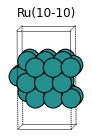
Cut out Ru(0001) and Ru(10-10) slabs
The PLAMS Molecule class does not have any methods for creating slabs. However, we can use the ChemicalSystem in AMS2024+. The details can be found in the slice_slab() function in common_ru_h.py.
from common_ru_h import slice_slab

slab_100 = slice_slab(
    optimized_bulk,
    miller=(1, 0, 0),
    thickness=7.0,
    cell_z=15,
    ref_atom=0,
)
slab_100 = slab_100.supercell(3, 2, 1)
for at in slab_100:
    at.properties = Settings()  # remove details about supercell generation
plams.plot_molecule(slab_100, rotation=rotation)
plt.title("Ru(10-10)");
from common_ru_h import slice_slab

slab_001 = slice_slab(
    optimized_bulk,
    miller=(0, 0, 1),
    thickness=7.0,
    cell_z=15,
    ref_atom=0,
)
slab_001 = slab_001.supercell([[3, 0, 0], [2, 4, 0], [0, 0, 1]])
for at in slab_001:
    at.properties = Settings()  # remove details about supercell generation
plams.plot_molecule(slab_001, rotation=rotation)
plt.title("Ru(0001)");
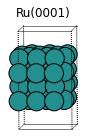
This slab is perhaps too thick, so let’s remove the top atomic layer:
for at in slab_001:
    if at.coords[2] > 10:
        slab_001.delete_atom(at)

plams.plot_molecule(slab_001, rotation=rotation)
plt.title("Ru(0001)");

Add hydrogens
from common_ru_h import add_adsorbate

slab_100_H = add_adsorbate(slab_100, "H", frac_x=0, frac_y=0, delta_z=2.0)
# add second adsorbate, now delta_z=2.0 means 2 angstrom above the previous H
slab_100_H2 = add_adsorbate(slab_100_H, "H", frac_x=0.5, frac_y=0.5, delta_z=2.0)
plams.plot_molecule(slab_100_H2, rotation=rotation, radii=0.6)
plt.title("Ru(10-10) with H");

from common_ru_h import add_adsorbate

slab_001_H = add_adsorbate(slab_001, "H", frac_x=0, frac_y=0, delta_z=2.0)
slab_001_H2 = add_adsorbate(slab_001_H, "H", frac_x=0.5, frac_y=0.5, delta_z=2.0)
plams.plot_molecule(slab_001_H2, rotation=rotation, radii=0.6)
plt.title("Ru(0001) with H");

Set up and run the jobs
Ru-H distance bond scan on Ru(10-10)
from common_ru_h import get_surface_bond_scan_coordinates
from common_ru_h import (
    get_bottom_atom_index,
    pesscan_settings,
    m3gnet_up_settings,
    constraints_settings,
    plot_pesscan,
)

system = slab_100_H

scan_coordinates = get_surface_bond_scan_coordinates(
    system, atom_index=len(system), start=1.2, end=2.5
)
pesscan_Ru_H_distance = plams.AMSJob(
    settings=(
        pesscan_settings(scan_coordinates, n_points=6)
        + m3gnet_up_settings()
        + constraints_settings(get_bottom_atom_index(system))
    ),
    name="PESScan_Ru_H_distance_m3gnet",
    molecule=system,
)
pesscan_Ru_H_distance.run()
# !amsmovie {pesscan_Ru_H_distance.results.rkfpath()}  # open in AMSmovie
plot_pesscan(pesscan_Ru_H_distance);
[31.05|11:15:31] JOB PESScan_Ru_H_distance_m3gnet STARTED
[31.05|11:15:31] JOB PESScan_Ru_H_distance_m3gnet RUNNING
[31.05|11:16:35] JOB PESScan_Ru_H_distance_m3gnet FINISHED
[31.05|11:16:36] Job PESScan_Ru_H_distance_m3gnet reported warnings. Please check the output
[31.05|11:16:36] JOB PESScan_Ru_H_distance_m3gnet SUCCESSFUL

Surface and bulk diffusion H on/in Ru(10-10)
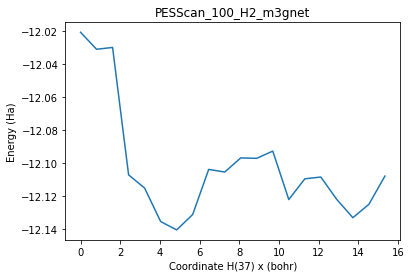
Note: These PES scans are just meant to sample H atoms diffusing through the slab and on the surface.
You can also set up more intelligent PES scans (for example, to sample diffusion along specific pathways like hcp-bridge-fcc etc.). In these examples, the H atom simply diffuses from one corner of the cell to the opposite corner.
from common_ru_h import (
    get_surface_diffusion_scan_coordinates,
    get_bulk_diffusion_scan_coordinates,
)
from common_ru_h import (
    get_bottom_atom_index,
    pesscan_settings,
    m3gnet_up_settings,
    constraints_settings,
    plot_pesscan,
)

system = slab_100_H2

scan_coordinates = get_surface_diffusion_scan_coordinates(
    system, atom_index=len(system) - 1
)
scan_coordinates += get_bulk_diffusion_scan_coordinates(
    system, atom_index=len(system), delta_z=2.0
)

pesscan_100_H2 = plams.AMSJob(
    settings=(
        pesscan_settings(scan_coordinates, n_points=20)
        + m3gnet_up_settings()
        + constraints_settings(get_bottom_atom_index(system))
    ),
    name="PESScan_100_H2_m3gnet",
    molecule=system,
)
pesscan_100_H2.run()
# !amsmovie {pesscan_100_H2.results.rkfpath()}  # open in AMSmovie
plot_pesscan(pesscan_100_H2);
Atom 37 will diffuse from (x, y) = 0.0, 0.0 to 8.1145, 8.547 with the z coordinate optimized
Atom 38 will diffuse from z = 14.1507 to 2.6849 with the x and y coordinates optimized
[31.05|11:16:36] JOB PESScan_100_H2_m3gnet STARTED
[31.05|11:16:36] JOB PESScan_100_H2_m3gnet RUNNING
[31.05|11:18:14] JOB PESScan_100_H2_m3gnet FINISHED
[31.05|11:18:14] JOB PESScan_100_H2_m3gnet SUCCESSFUL
Surface and bulk diffusion H on/in Ru(0001)
from common_ru_h import (
    get_surface_diffusion_scan_coordinates,
    get_bulk_diffusion_scan_coordinates,
)
from common_ru_h import (
    get_bottom_atom_index,
    pesscan_settings,
    m3gnet_up_settings,
    constraints_settings,
    plot_pesscan,
)

system = slab_001_H2

scan_coordinates = get_surface_diffusion_scan_coordinates(
    system, atom_index=len(system) - 1
)
scan_coordinates += get_bulk_diffusion_scan_coordinates(
    system, atom_index=len(system), delta_z=2.0
)

pesscan_001_H2 = plams.AMSJob(
    settings=(
        pesscan_settings(scan_coordinates, n_points=20)
        + m3gnet_up_settings()
        + constraints_settings(get_bottom_atom_index(system))
    ),
    name="PESScan_001_H2_m3gnet",
    molecule=system,
)
pesscan_001_H2.run()
# !amsmovie {pesscan_001_H2.results.rkfpath()}  # open in AMSmovie
plot_pesscan(pesscan_001_H2);
Atom 37 will diffuse from (x, y) = 0.0, 0.0 to 8.1145, 9.3698 with the z coordinate optimized
Atom 38 will diffuse from z = 12.5470 to 2.2735 with the x and y coordinates optimized
[31.05|11:18:15] JOB PESScan_001_H2_m3gnet STARTED
[31.05|11:18:15] JOB PESScan_001_H2_m3gnet RUNNING
[31.05|11:19:49] JOB PESScan_001_H2_m3gnet FINISHED
[31.05|11:19:49] JOB PESScan_001_H2_m3gnet SUCCESSFUL

Run DFT singlepoints on PES Scan structures and store on disk
from common_ru_h import dft_settings, replay_settings, QEKPointsConfig

replay_jobs = dict()
for pesscan_job in [pesscan_Ru_H_distance, pesscan_100_H2, pesscan_001_H2]:
    name = f"dft_replay_{pesscan_job.name}"
    settings = dft_settings(QEKPointsConfig(3, 3, 1)) + replay_settings(
        pesscan_job.results.rkfpath()
    )
    replay_jobs[name] = plams.AMSJob(
        settings=settings,
        name=name,
    )
ri = ResultsImporter.from_yaml(old_ref_dir)
for name, job in replay_jobs.items():
    job.run()
    ri.add_trajectory_singlepoints(job, properties=["energy", "forces"])
    ri.store(new_ref_dir)
    plot_pesscan(job)
[31.05|11:19:50] JOB dft_replay_PESScan_Ru_H_distance_m3gnet STARTED
[31.05|11:19:50] JOB dft_replay_PESScan_Ru_H_distance_m3gnet RUNNING
[31.05|11:36:42] JOB dft_replay_PESScan_Ru_H_distance_m3gnet FINISHED
[31.05|11:36:42] JOB dft_replay_PESScan_Ru_H_distance_m3gnet SUCCESSFUL
[31.05|11:36:43] JOB dft_replay_PESScan_100_H2_m3gnet STARTED
... output trimmed ....
[31.05|12:59:35] JOB dft_replay_PESScan_100_H2_m3gnet SUCCESSFUL
[31.05|12:59:35] JOB dft_replay_PESScan_001_H2_m3gnet STARTED
[31.05|12:59:35] JOB dft_replay_PESScan_001_H2_m3gnet RUNNING
[31.05|14:22:58] JOB dft_replay_PESScan_001_H2_m3gnet FINISHED
[31.05|14:22:58] JOB dft_replay_PESScan_001_H2_m3gnet SUCCESSFUL


See also
Python Script
#!/usr/bin/env python
# coding: utf-8

# ## Initial imports

import scm.plams as plams
from scm.params import ResultsImporter
from scm.plams import Settings, AMSJob, log, Molecule
from pathlib import Path
import matplotlib.pyplot as plt

# common_ru_h.py must exist in the current working directory
from common_ru_h import rotation, check_installation

# register dependencies for AMSjobs, to support submitting this notebook directly to a cluster in AMS2025+
# dependency: {}  common_ru_h.py
# dependency: {}  reference_data_1


# ## Initialize PLAMS working directory

old_ref_dir = "reference_data_1"
check_installation(old_ref_dir)
new_ref_dir = "reference_data_2"
ri = ResultsImporter.from_yaml(old_ref_dir)
plams.init()


# ## Load the optimized bulk Ru structure from the job collection
#
# The lattice was optimized in the previous notebook, and the structure was stored in the job collection.
#
# Let's retrieve it from the job collection and use it to construct Ru surface slabs.

optimized_bulk = ri.job_collection["hcp_lattopt_Ru_dft"].molecule
plams.plot_molecule(optimized_bulk, rotation=rotation)
plt.title("Bulk hcp Ru")
plt.gcf().savefig("picture1.png")
plt.clf()


# ## Cut out Ru(0001) and Ru(10-10) slabs
#
# The PLAMS Molecule class does not have any methods for creating slabs. However, we can use the ChemicalSystem in AMS2024+. The details can be found in the ``slice_slab()`` function in common_ru_h.py.

from common_ru_h import slice_slab

slab_100 = slice_slab(
    optimized_bulk,
    miller=(1, 0, 0),
    thickness=7.0,
    cell_z=15,
    ref_atom=0,
)
slab_100 = slab_100.supercell(3, 2, 1)
for at in slab_100:
    at.properties = Settings()  # remove details about supercell generation
plams.plot_molecule(slab_100, rotation=rotation)
plt.title("Ru(10-10)")
plt.gcf().savefig("picture2.png")
plt.clf()


from common_ru_h import slice_slab

slab_001 = slice_slab(
    optimized_bulk,
    miller=(0, 0, 1),
    thickness=7.0,
    cell_z=15,
    ref_atom=0,
)
slab_001 = slab_001.supercell([[3, 0, 0], [2, 4, 0], [0, 0, 1]])
for at in slab_001:
    at.properties = Settings()  # remove details about supercell generation
plams.plot_molecule(slab_001, rotation=rotation)
plt.title("Ru(0001)")
plt.gcf().savefig("picture3.png")
plt.clf()


# This slab is perhaps too thick, so let's remove the top atomic layer:

for at in slab_001:
    if at.coords[2] > 10:
        slab_001.delete_atom(at)

plams.plot_molecule(slab_001, rotation=rotation)
plt.title("Ru(0001)")
plt.gcf().savefig("picture4.png")
plt.clf()


# ## Add hydrogens

from common_ru_h import add_adsorbate

slab_100_H = add_adsorbate(slab_100, "H", frac_x=0, frac_y=0, delta_z=2.0)
# add second adsorbate, now delta_z=2.0 means 2 angstrom above the previous H
slab_100_H2 = add_adsorbate(slab_100_H, "H", frac_x=0.5, frac_y=0.5, delta_z=2.0)
plams.plot_molecule(slab_100_H2, rotation=rotation, radii=0.6)
plt.title("Ru(10-10) with H")
plt.gcf().savefig("picture5.png")
plt.clf()


from common_ru_h import add_adsorbate

slab_001_H = add_adsorbate(slab_001, "H", frac_x=0, frac_y=0, delta_z=2.0)
slab_001_H2 = add_adsorbate(slab_001_H, "H", frac_x=0.5, frac_y=0.5, delta_z=2.0)
plams.plot_molecule(slab_001_H2, rotation=rotation, radii=0.6)
plt.title("Ru(0001) with H")
plt.gcf().savefig("picture6.png")
plt.clf()


# ## Set up and run the jobs

# ### Ru-H distance bond scan on Ru(10-10)

from common_ru_h import get_surface_bond_scan_coordinates
from common_ru_h import (
    get_bottom_atom_index,
    pesscan_settings,
    m3gnet_up_settings,
    constraints_settings,
    plot_pesscan,
)

system = slab_100_H

scan_coordinates = get_surface_bond_scan_coordinates(system, atom_index=len(system), start=1.2, end=2.5)
pesscan_Ru_H_distance = plams.AMSJob(
    settings=(
        pesscan_settings(scan_coordinates, n_points=6)
        + m3gnet_up_settings()
        + constraints_settings(get_bottom_atom_index(system))
    ),
    name="PESScan_Ru_H_distance_m3gnet",
    molecule=system,
)
pesscan_Ru_H_distance.run()
# !amsmovie {pesscan_Ru_H_distance.results.rkfpath()}  # open in AMSmovie
plot_pesscan(pesscan_Ru_H_distance)
# ### Surface and bulk diffusion H on/in Ru(10-10)
#
# Note: These PES scans are just meant to sample H atoms diffusing through the slab and on the surface.
#
# You can also set up more intelligent PES scans (for example, to sample diffusion along specific pathways like hcp-bridge-fcc etc.). In these examples, the H atom simply diffuses from one corner of the cell to the opposite corner.

from common_ru_h import (
    get_surface_diffusion_scan_coordinates,
    get_bulk_diffusion_scan_coordinates,
)
from common_ru_h import (
    get_bottom_atom_index,
    pesscan_settings,
    m3gnet_up_settings,
    constraints_settings,
    plot_pesscan,
)

system = slab_100_H2

scan_coordinates = get_surface_diffusion_scan_coordinates(system, atom_index=len(system) - 1)
scan_coordinates += get_bulk_diffusion_scan_coordinates(system, atom_index=len(system), delta_z=2.0)

pesscan_100_H2 = plams.AMSJob(
    settings=(
        pesscan_settings(scan_coordinates, n_points=20)
        + m3gnet_up_settings()
        + constraints_settings(get_bottom_atom_index(system))
    ),
    name="PESScan_100_H2_m3gnet",
    molecule=system,
)
pesscan_100_H2.run()
# !amsmovie {pesscan_100_H2.results.rkfpath()}  # open in AMSmovie
plot_pesscan(pesscan_100_H2)
# ### Surface and bulk diffusion H on/in Ru(0001)

from common_ru_h import (
    get_surface_diffusion_scan_coordinates,
    get_bulk_diffusion_scan_coordinates,
)
from common_ru_h import (
    get_bottom_atom_index,
    pesscan_settings,
    m3gnet_up_settings,
    constraints_settings,
    plot_pesscan,
)

system = slab_001_H2

scan_coordinates = get_surface_diffusion_scan_coordinates(system, atom_index=len(system) - 1)
scan_coordinates += get_bulk_diffusion_scan_coordinates(system, atom_index=len(system), delta_z=2.0)

pesscan_001_H2 = plams.AMSJob(
    settings=(
        pesscan_settings(scan_coordinates, n_points=20)
        + m3gnet_up_settings()
        + constraints_settings(get_bottom_atom_index(system))
    ),
    name="PESScan_001_H2_m3gnet",
    molecule=system,
)
pesscan_001_H2.run()
# !amsmovie {pesscan_001_H2.results.rkfpath()}  # open in AMSmovie
plot_pesscan(pesscan_001_H2)
# ## Run DFT singlepoints on PES Scan structures and store on disk

from common_ru_h import dft_settings, replay_settings, QEKPointsConfig

replay_jobs = dict()
for pesscan_job in [pesscan_Ru_H_distance, pesscan_100_H2, pesscan_001_H2]:
    name = f"dft_replay_{pesscan_job.name}"
    settings = dft_settings(QEKPointsConfig(3, 3, 1)) + replay_settings(pesscan_job.results.rkfpath())
    replay_jobs[name] = plams.AMSJob(
        settings=settings,
        name=name,
    )


ri = ResultsImporter.from_yaml(old_ref_dir)
for name, job in replay_jobs.items():
    job.run()
    ri.add_trajectory_singlepoints(job, properties=["energy", "forces"])
    ri.store(new_ref_dir)
    plot_pesscan(job)
Required additional files
common_ru_h.py
"""
This file is part of the Ru/H active learning example in AMS.

The most important things to modify/inspect are:
1) the TESTING_MODE (see below), and
2) the dft_settings() function.

"""

import matplotlib.pyplot as plt
import numpy as np
import os
import scm.plams as plams
from dataclasses import dataclass
from pathlib import Path
from scm.base import Units, Lattice
from scm.utils.conversions import plams_molecule_to_chemsys, chemsys_to_plams_molecule
from typing import List, Optional, Literal, Tuple, ClassVar, Sequence, Union
from scm.version import release
import subprocess

ang2bohr = Units.conversion_factor("angstrom", "bohr")  # angstrom to bohr
rotation = "-85x,-5y,0z"  # plotting view in Jupyter notebook


TESTING_MODE = False  # set to True to use a custom M3GNet instead of DFT calculations for quick testing run-through


@dataclass
class QEKPointsConfig:
    """Class representing the K_Points input for Quantum ESPRESSO"""

    x: int = 1
    y: int = 1
    z: int = 1
    shift_x: bool = False
    shift_y: bool = False
    shift_z: bool = False

    def to_settings(self) -> plams.Settings:
        """Converts config to PLAMS Settings at the top level"""
        s = plams.Settings()
        if self.x == 1 and self.y == 1 and self.z == 1:
            s.input.QuantumEspresso.K_Points._h = "gamma"
            return s
        s.input.QuantumEspresso.K_Points._h = "automatic"
        s.input.QuantumEspresso.K_Points._1 = (
            f"{self.x} {self.y} {self.z} " f"{int(self.shift_x)} {int(self.shift_y)} {int(self.shift_z)}"
        )
        return s


###########################################
#### Calculation settings functions
###########################################


def dft_settings(kpoints: QEKPointsConfig = QEKPointsConfig(), conv_thr: float = 1e-6) -> plams.Settings:
    """Returns PLAMS Settings for Quantum ESPRESSO PBE-D3(BJ) with Gaussian Smearing

    kpoints will default to the Gamma point if not specified.
    """
    if TESTING_MODE:
        d = Path(os.path.expandvars("$AMSRESOURCES/MLPotential/M3GNet/RuH/engine.txt"))
        if not d.exists():
            raise FileNotFoundError(f"Couldn't find {d}. This file/directory was added in AMS2024.102.")
        plams.log(
            f"Warning: Using custom M3GNet potential from {d} and not DFT! "
            "Set TESTING_MODE = False in common_ru_h.py for running proper calculations."
        )
        s = plams.AMSJob.from_inputfile(str(d)).settings
        s.runscript.nproc = 1
        return s
    s = plams.Settings()
    s += kpoints.to_settings()
    s.input.QuantumEspresso.System.occupations = "smearing"
    s.input.QuantumEspresso.System.degauss = 0.015
    s.input.QuantumEspresso.Pseudopotentials.Family = "SSSP-Efficiency"
    s.input.QuantumEspresso.Pseudopotentials.Functional = "PBE"
    s.input.QuantumEspresso.System.dftd3_version = 4
    s.input.QuantumEspresso.System.vdw_corr = "Grimme-D3"
    s.input.QuantumEspresso.Electrons.conv_thr = conv_thr
    # delete the *.save, worker.*, and *.xml files since they are no longer needed
    # for parametrization jobs
    s.runscript.postamble_lines = ["rm -rf quantumespresso.save PESPoint*.save worker.* *.xml"]

    return s


def replay_settings(rkf: Union[str, os.PathLike], frames: Optional[List[int]] = None) -> plams.Settings:
    """Settings for AMS Replay jobs. Always sets Properties%Gradients = "Yes".

    :param rkf: Path to ams.rkf file from which to extract frames
    :type rkf: os.PathLike
    :param frames: Which frames (indexing starts with 1) to replay. For details, see the AMS Replay documentation.
    :type frames: Optional[List[int]], optional
    :raises FileNotFoundError: If the ams.rkf file does not exist.
    :return: Returns PLAMS Settings object at the top level.
    :rtype: plams.Settings
    """
    s = plams.Settings()
    s.input.ams.Task = "Replay"
    s.input.ams.Properties.Gradients = "Yes"
    rkf = Path(rkf).resolve()
    if not rkf.exists():
        raise FileNotFoundError(f"{rkf} does not exist")
    s.input.ams.Replay.File = str(rkf)
    if frames:
        s.input.ams.Replay.Frames = " ".join(str(x) for x in frames)
    return s


def m3gnet_up_settings() -> plams.Settings:
    """Returns PLAMS Settings for the M3GNet Universal Potential"""
    s = plams.Settings()
    s.input.MLPotential.Model = "M3GNet-UP-2022"
    s.runscript.nproc = 1  # always run AMS Driver in serial for MLPotential
    return s


def lattice_optimization_settings() -> plams.Settings:
    """Returns PLAMS settings for lattice optimization"""
    s = plams.Settings()
    s.input.ams.Task = "GeometryOptimization"
    s.input.ams.GeometryOptimization.OptimizeLattice = "Yes"
    return s


def constraints_settings(constrained_atoms: Optional[Union[int, Sequence[int]]] = None) -> plams.Settings:
    """Sets settings.input.ams.Constraints.Atom. Returns Settings at top level"""
    s = plams.Settings()
    if constrained_atoms is None:
        return s
    if isinstance(constrained_atoms, int):
        s.input.ams.Constraints.Atom = [constrained_atoms]
    else:
        s.input.ams.Constraints.Atom = list(constrained_atoms)

    return s


def pesscan_settings(
    scan_coordinates: Sequence["SingleScanCoordinate"],
    n_points=10,
) -> plams.Settings:
    s = plams.Settings()
    s.input.ams.Task = "PESScan"
    # fix at least 1 Ru atom in place to prevent the entire slab from diffusing
    s.input.ams.PESScan.ScanCoordinate = [plams.Settings()]
    s.input.ams.PESScan.ScanCoordinate[0].nPoints = n_points
    s.input.ams.PESScan.ScanCoordinate[0] += scan_coordinate_list_to_settings(scan_coordinates)
    s.input.ams.PESScan.CalcPropertiesAtPESPoints = "Yes"

    return s


###########################################
##### General structure functions #########
###########################################


def slice_slab(
    bulk: plams.Molecule,
    miller: Tuple[int, int, int],
    thickness: float = 7.0,
    cell_z: float = 15.0,
    ref_atom: int = 0,
) -> plams.Molecule:
    """Returns a slab cut out from the bulk crystal.

    :param bulk: The bulk crystal
    :type bulk: plams.Molecule
    :param miller: Miller indices. For hexagonal crystals with 4 indices, do not specify the third index.
    :type miller: Tuple[int, int, int]
    :param thickness: Approximate thickness of slab (angstrom), defaults to 7.0
    :type thickness: float, optional
    :param cell_z: Lattice parameter in the surface normal direction (angstrom), defaults to 15.0
    :type cell_z: float, optional
    :param ref_atom: Reference atom index (0-based), defaults to 0
    :type ref_atom: int, optional
    :return: Returns a slab (3D periodicity with a vacuum gap)
    :rtype: plams.Molecule
    """
    def with_vacuum_lattice(system, vacuum_height: float):
        """Return the chemical system with a fresh 3D lattice including vacuum."""
        vectors = np.asarray(system.lattice.vectors)
        new_vectors = np.concatenate((vectors, [[0.0, 0.0, vacuum_height]]), axis=0)
        system.lattice = Lattice(new_vectors)
        return system

    if get_ams_version() < "2024.2":
        # Backwards-compatible version for AMS2024 where Chemical System was in Bohr, had transposed coords and different slice API
        slab = plams_molecule_to_chemsys(bulk)
        slab.slice_thickness(
            ref_atom=ref_atom,
            top=(cell_z / 2 + thickness / 2) * ang2bohr,  # bohr
            bottom=(cell_z / 2 - thickness / 2) * ang2bohr,  # bohr
            miller=miller,  # 1, 0, -1, 0 (third index ignored for hexagonal cell)
            translate=0.0,
        )
        slab = with_vacuum_lattice(slab, cell_z * ang2bohr)
    else:
        bulk_cs = plams_molecule_to_chemsys(bulk)
        slab = bulk_cs.make_slab_thickness(
            miller=miller,  # 1, 0, -1, 0 (third index ignored for hexagonal cell)
            top=(cell_z / 2 + thickness / 2),
            bottom=(cell_z / 2 - thickness / 2),
            translate=0.0,
            ref_atom=ref_atom,
        )
        slab = with_vacuum_lattice(slab, cell_z)

    # slab.supercell([3, 2])  # create a 3x2 supercell
    slab.map_atoms([0, 0, 0])  # maps atoms into the 0..1 0..1 unit cell

    return chemsys_to_plams_molecule(slab)


def add_adsorbate(
    slab: plams.Molecule,
    symbol: str = "H",
    frac_x: float = 0.0,
    frac_y: float = 0.0,
    delta_z: float = 2.0,
) -> plams.Molecule:
    """
    Adds an atom with given fractional xy coordinates on top of the slab, with a distance of delta_z (angstrom).

    Returns a new plams.Molecule
    """
    surface_lattice = np.array(slab.lattice)[:2, :2]
    x, y = frac_x * surface_lattice[0] + frac_y * surface_lattice[1]
    max_z = np.max(slab.as_array()[:, 2])
    z = max_z + delta_z
    ret = slab.copy()
    ret.add_atom(plams.Atom(symbol=symbol, coords=(x, y, z)))
    return ret


def get_bottom_atom_index(mol: plams.Molecule) -> int:
    """Returns 1-based index of the atom with the smallest z coordinate"""

    return int(np.argmin(mol.as_array()[:, 2])) + 1


##########################################################
##### Functions and classes for PES Scan coordinates #####
##########################################################


@dataclass
class SingleScanCoordinate:
    key: ClassVar[str] = "MustBeOverridden"


@dataclass
class CartesianScanCoordinate(SingleScanCoordinate):
    """
    Small helper class for data inside a cartesian coordinate in the PESScan task.

    Multiple cartesian scan coordinates can be combined into a single PESScan scan coordinate.
    """

    key: ClassVar[str] = "Coordinate"

    atom: int  # first atom has index 1
    coordinate: Literal["x", "y", "z"]
    start: float  # starting coordinate in angstrom
    end: float  # final coordinate in angstrom

    def __str__(self) -> str:
        """Returns a string in the AMS input format"""
        return f"{self.atom} {self.coordinate} {self.start:.4f} {self.end:.4f}"


@dataclass
class CellVolumeScalingRangeScanCoordinate(SingleScanCoordinate):
    """
    Small helper class for data inside a cell volume scaling range coordinate in the PESScan task.
    """

    key: ClassVar[str] = "CellVolumeScalingRange"

    start: float  # starting coordinate in angstrom
    end: float  # final coordinate in angstrom

    def __str__(self) -> str:
        """Returns a string in the AMS input format"""
        return f"{self.start} {self.end}"


@dataclass
class DistanceScanCoordinate(SingleScanCoordinate):
    """
    Small helper class for data inside a distance coordinate in the PESScan task.
    """

    key: ClassVar[str] = "Distance"

    atom1: int  # first atom has index 1
    atom2: int  # first atom has index 1
    start: float  # starting coordinate in angstrom
    end: float  # final coordinate in angstrom

    def __str__(self) -> str:
        """Returns a string in the AMS input format"""
        return f"{self.atom1} {self.atom2} {self.start:.4f} {self.end:.4f}"


def scan_coordinate_list_to_settings(scan_coordinates: Sequence[SingleScanCoordinate]) -> plams.Settings:
    """
    Return value is not at the top level.

    Example: s.input.ams.PESScan.ScanCoordinate[0] = scan_coordinate_list_to_settings([sc1, sc2])
    """
    s = plams.Settings()
    for x in scan_coordinates:
        if x.key not in s:
            s[x.key] = []
        s[x.key].append(str(x))

    return s


def get_surface_diffusion_scan_coordinates(
    slab: plams.Molecule,
    atom_index: int,
) -> List[CartesianScanCoordinate]:
    """Cause the atom with index ``atom_index`` (1-based) to diffuse to the top right corner of the unit cell.

    :param slab: Slab including adsorbate
    :type slab: plams.Molecule
    :param atom_index: One-based atom index, defaults to None
    :type atom_index: Optional[int], optional
    :return: List of CartesianScanCoordinate that can be used for PES Scans
    :rtype: List[CartesianScanCoordinate]
    """
    orig_x, orig_y = slab[atom_index].coords[0], slab[atom_index].coords[1]
    lattice = np.array(slab.lattice)
    target_xy = np.round(lattice[0, :2] + lattice[1, :2], decimals=4)
    target_x, target_y = target_xy
    print(
        f"Atom {atom_index} will diffuse from "
        f"(x, y) = {orig_x}, {orig_y} to {target_x}, {target_y} "
        "with the z coordinate optimized"
    )
    return [
        CartesianScanCoordinate(atom=atom_index, coordinate="x", start=orig_x, end=target_x),
        CartesianScanCoordinate(atom=atom_index, coordinate="y", start=orig_y, end=target_y),
    ]


def get_bulk_diffusion_scan_coordinates(
    slab: plams.Molecule, atom_index: int, delta_z: float = 2.0
) -> List[CartesianScanCoordinate]:
    """Cause the atom with index ``atom_index`` (1-based) to diffuse through the slab.

    :param slab: _description_
    :type slab: plams.Molecule
    :param atom_index: _description_
    :type atom_index: int
    :return: _description_
    :rtype: List[CartesianScanCoordinate]
    """
    target_z = np.min(slab.as_array()[:, 2]) - delta_z
    orig_z = slab[atom_index].coords[2]
    print(
        f"Atom {atom_index} will diffuse from "
        f"z = {orig_z:.4f} to {target_z:.4f} "
        "with the x and y coordinates optimized"
    )
    return [CartesianScanCoordinate(atom=atom_index, coordinate="z", start=orig_z, end=target_z)]


def get_surface_bond_scan_coordinates(
    slab: plams.Molecule, atom_index: int, start: Optional[float] = None, end: float = 1.2
) -> List[DistanceScanCoordinate]:
    """Cause the atom with index ``atom_index`` (1-based)
    to move towards its nearest neighbor until the distance is ``target_length.

    start: float
        If None will use the current distance

    end: float
        Target distance (angstrom)
    """

    ase_atoms = plams.toASE(slab)
    distance_matrix = ase_atoms.get_all_distances(mic=True)
    row = distance_matrix[atom_index - 1, :]
    row[atom_index - 1] = 1e10
    min_d = np.min(row)
    min_i = int(np.argmin(row) + 1)

    start = start or min_d

    return [DistanceScanCoordinate(atom1=atom_index, atom2=min_i, start=start, end=end)]


########
## Plotting functions
########


def plot_pesscan(job: plams.AMSJob, title: Optional[str] = None, ax=None) -> plt.Axes:
    """Plots a PESScan finished PESScan job. If multiple scan coordinates only uses the first one on the x axis."""
    if ax is None:
        fig, ax = plt.subplots()

    r = job.results.get_pesscan_results()

    ax.plot(r["RaveledPESCoords"][0], r["PES"])
    ax.set_xlabel(f"{r['RaveledScanCoords'][0]} ({r['RaveledUnits'][0]})")
    ax.set_ylabel("Energy (Ha)")
    ax.ticklabel_format(useOffset=False)
    ax.set_title(title or str(job.name))

    return ax


#######
## Check that correct versions of packages are installed
#######


def run_amspackages_check(package: str) -> subprocess.CompletedProcess:
    x = subprocess.run(
        ["sh", os.path.expandvars("$AMSBIN/amspackages"), "-v", "check", package], stdout=subprocess.PIPE, text=True
    )
    return x


def get_qe_version_and_build() -> Tuple[Union[str, None], Union[int, None]]:
    x = run_amspackages_check("qe")
    print(x.stdout.strip())
    if x.returncode != 0:
        return None, None

    try:
        version_number = x.stdout.split("v[")[1].split("]")[0]
        build_number = int(x.stdout.split("build:")[1].split()[0])
    except (KeyError, IndexError, TypeError):
        return None, None

    return version_number, build_number


def check_qe_installation():
    if TESTING_MODE:
        return True

    min_build = 115
    msg = f"QE must be at least version 7.1, build {min_build}. Install or update through the AMS package manager."

    version_number, build_number = get_qe_version_and_build()

    assert version_number is not None, msg
    assert build_number is not None, msg

    assert version_number >= "7.1", msg

    if version_number == "7.1":
        assert build_number >= min_build, msg


def check_m3gnet_installation():
    x = run_amspackages_check("m3gnet")
    print(x.stdout.strip())
    assert x.returncode == 0, f"m3gnet is not installed. Install it through the AMS package manager."


def get_ams_version() -> str:
    return release


def check_ams_installation(min_version="2024.102"):
    ams_version = get_ams_version()
    print(f"Current AMS version: {ams_version}")
    assert ams_version >= min_version, f"AMS version must be at least {min_version}"


def check_installation(ref_dir: Optional[Union[Path, str]] = None):
    check_ams_installation()
    check_m3gnet_installation()
    check_qe_installation()
    if ref_dir:
        assert Path(ref_dir).exists(), f"{ref_dir} must exist in the current working directory."