
Thermo-oxidative degradation of poly(acrylate) elastomer with ReaxFF
ReaxFF enables simulation of thermal degradation in polymers. The example in this tutorial has been based on a study published by Denka on nanofiller effects in acrylic rubber. The required forcefield is included in AMS.
We will show how to build a poly(acrylate)/oxygen system, run several short ReaxFF molecular dynamics trajectories at different temperatures in parallel, and analyze the resulting species and degradation trends from the AMS molecule history. This allows us to determine reaction products, activation energies and material lifetimes.
Downloads: Notebook | Script ?
Estimated Time: 1.0 h
Additional files required by this example:
thermo_oxidative_polyacrylate_reaxff_helpers.py
Requires: AMS2027 or later
Related examples
Related tutorials
Related documentation
Overview
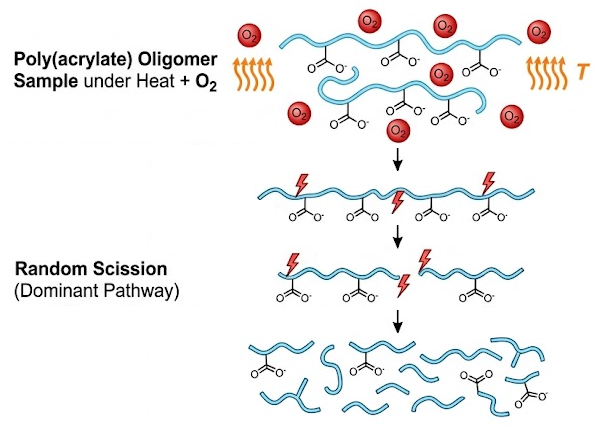
This notebook shows a PLAMS workflow for an accelerated thermo-oxidative degradation study with AMS/ReaxFF. The model system is a poly(acrylate) proxy oligomer mixed with molecular oxygen. The chemistry we want to observe is the onset of oxidation and fragmentation in an oxygen-rich polymer environment: oxygen should gradually be consumed, oxidized products (such as CO2) can appear, and the original polymer material can break into smaller oxygenated and hydrocarbon fragments.
This example will show how to set up and analyze this type of reactive simulation. Simulations will be conducted at higher temperatures such that reactive events can be observed on short MD timescales. This enables qualitative analysis of the thermal dependency. (To accurately reproduce experimental degradation rates, longer simulations should be conducted at modest temperatures.)
The main properties tracked during the simulation are the amount of unreacted_oxygen (O2), the amount of co2, the populations of small_neutral, small_oxygenated, medium_oxygenated_fragment, oxygenated_fragment, parent_or_large_fragment, and hydrocarbon_fragment, and a scission_proxy that acts as a qualitative indicator for fragmentation. These quantities are important because they summarize, in a compact way, how much oxidant is left, how far oxidation has progressed, and how strongly the original polymer-like material is being broken down.
Each family of reaction products has been given a practical label:
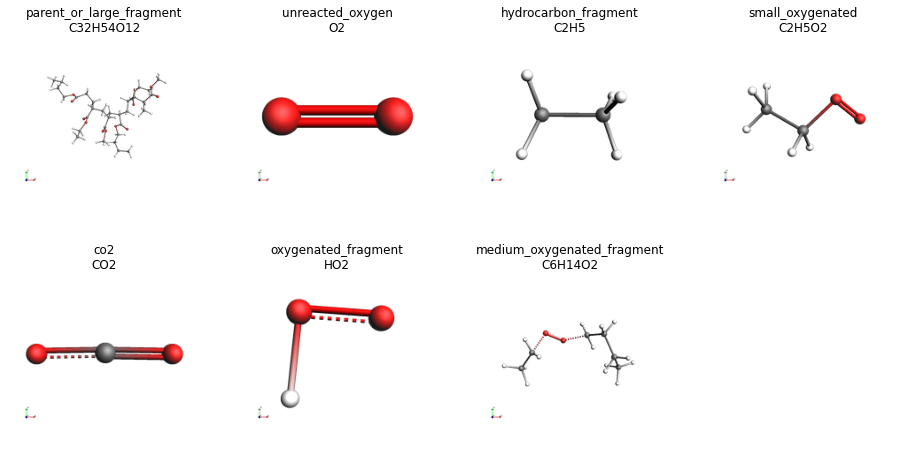
unreacted_oxygen: molecules identified asO2.co2: molecules identified asCO2.small_neutral: very small neutral molecules tracked explicitly here asCO,H2O, orH2.small_oxygenated: carbon-and-oxygen-containing fragments with at most 4 carbon atoms.medium_oxygenated_fragment: oxygen-containing organic fragments with more than 4 carbon atoms but fewer than 8.oxygenated_fragment: oxygen-containing fragments that do not fall into the previous carbon-based oxygenated groups.parent_or_large_fragment: large carbon-containing fragments with at least 8 carbon atoms. This group includes material still close to the starting oligomer size.hydrocarbon_fragment: carbon-containing fragments without oxygen that do not fall into the large-fragment group.
The logic of the workflow is as follows: first build one representative polymer proxy oligomer, then place it in contact with explicit oxygen, and finally compare several temperatures. The oligomer structure is relaxed before packing so the reactive system starts from a sensible structure. Oxygen is added explicitly because the goal is to study oxidation chemistry rather than pure thermal fragmentation. Running four temperatures lets us see whether the same qualitative chemistry becomes stronger or faster as the temperature increases.
Below, the time-dependent plots in the output show this effect on the elementary stages of the degradation process: a reduction in unreacted oxygen suggests more rapid oxidation, increasing CO2 suggests deeper oxidative breakdown, increasing oxygenated fragments point to oxidized intermediates, and a growing scission proxy suggests stronger fragmentation of the original material.
Now, let’s start!
Imports and global settings
import matplotlib.pyplot as plt
import numpy as np
import pandas as pd

from scm.plams import AMSJob, JobRunner, Settings, config, from_smiles, packmol, plot_image_grid, view
Practical notes
For systems below 1000 atoms, it is most efficient to run ReaxFF in serial. Each MD job therefore uses
nproc = 1andOMP_NUM_THREADS = 1.For parallelization, simulations at each temperature are run concurrently through the PLAMS
JobRunner.The trajectories are deliberately short and accelerated. Increase the number of MD steps for a longer study, or decrease the trajectory sampling frequency if you want finer reaction-event resolution.
Reusable helper functions
The helper functions for this notebook live in the local file thermo_oxidative_polyacrylate_reaxff_helpers.py.
They convert AMS molecule histories into tables, group species into the product families, and prepare representative molecules for display.
You can continue the notebook without getting into the details of those functions. Only users who want to inspect or modify the implementation need to open the helper file.
# dependency: {} thermo_oxidative_polyacrylate_reaxff_helpers.py

from thermo_oxidative_polyacrylate_reaxff_helpers import (
    add_degradation_metrics,
    find_representative_molecule,
    molecule_counts_from_ams_results,
    prepare_molecule_for_display,
    species_family,
    summarize_product_families,
)
Note that the product-family labels introduced in the overview are only used as analysis categories. They are useful for comparing temperature trends, but they should not be interpreted as a complete mechanistic description of every reaction event in the trajectory.
Build the poly(acrylate) proxy oligomer
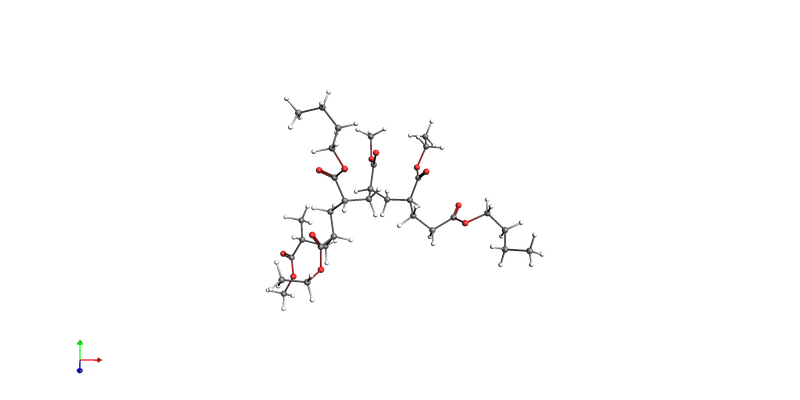
We begin by building one poly(acrylate) proxy oligomer from SMILES. This oligomer is the organic material whose oxidative degradation we want to follow later in the reactive box. Before mixing it with oxygen, we run a short ReaxFF geometry optimization so the oligomer starts from a reasonable, clash-free structure. The goal here is not an exhaustive conformer search, but simply to create a sensible building block for the packed simulation cell.
config.default_jobrunner = JobRunner(parallel=True, maxjobs=4)
config.default_jobmanager.hashing = None

polymer = from_smiles("CC(C(=O)OC)CC(C(=O)OCC)CC(C(=O)OCCCC)CC(C(=O)OC)CC(C(=O)OCC)CC(C(=O)OCCCC)")
oxygen = from_smiles("O=O")

print("Oligomer atoms:", len(polymer))
print("O2 atoms:", len(oxygen))
print("Target total atoms:", 8 * len(polymer) + 80 * len(oxygen))

go_settings = Settings()
go_settings.input.ReaxFF.ForceField = "CHO.ff"
go_settings.input.ams.Task = "GeometryOptimization"
go_settings.runscript.nproc = 1
go_settings.runscript.preamble_lines = ["export OMP_NUM_THREADS=1"]

go_job = AMSJob(name="00_clean_polyacrylate_oligomer", molecule=polymer, settings=go_settings)
go_results = go_job.run();

if go_results.ok():
    polymer_clean = go_results.get_main_molecule()
    print("Oligomer cleanup ok: True")
else:
    polymer_clean = polymer
    print("Oligomer cleanup ok: False")
    print("Continuing with the SMILES-built oligomer.")

view(polymer_clean, direction="along_pca3")
Oligomer atoms: 98
O2 atoms: 2
Target total atoms: 944
[01.07|19:14:37] JOB 00_clean_polyacrylate_oligomer STARTED
[01.07|19:14:37] Waiting for job 00_clean_polyacrylate_oligomer to finish
[01.07|19:14:37] JOB 00_clean_polyacrylate_oligomer RUNNING
[01.07|19:14:38] JOB 00_clean_polyacrylate_oligomer FINISHED
[01.07|19:14:38] JOB 00_clean_polyacrylate_oligomer SUCCESSFUL
Oligomer cleanup ok: True
Pack the polymer and oxygen reactants
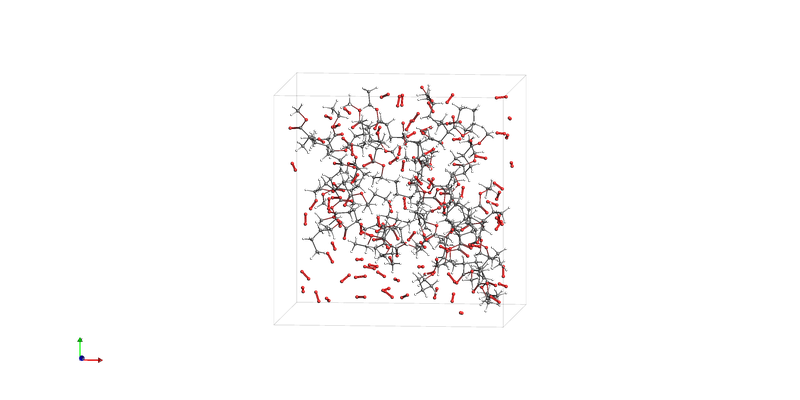
We now add explicit oxygen molecules to build the periodic simulation box. This step defines the reactive environment: the oligomers provide the organic material and O2 provides the oxidant. The chosen composition keeps the system close to the 1000-atom scale, which is practical for short ReaxFF trajectories while still being large enough to display competing oxidation and fragmentation events.
box = packmol(
    molecules=[polymer_clean, oxygen],
    n_molecules=[8, 80],
    density=0.65,
    seed=100,
)

view(box, direction="tilt_z")
Run short ReaxFF MD simulations at several temperatures
We run the same reactive system at four temperatures so that we can compare how strongly the oxidation and fragmentation chemistry is activated as the temperature increases. Each simulation uses one core, while PLAMS runs the different temperatures concurrently through a parallel JobRunner. The trajectories are intentionally short so the notebook remains practical, but they are still long enough to reveal differences in oxygen consumption, fragment formation, and overall degradation activity. (A fixed AMS random seed is assigned to make this notebook reproducible.)
The MD setup is deliberately simple. Random initial velocities are drawn at the target temperature, and a Berendsen thermostat is used to keep each trajectory close to that temperature during these short reactive runs. This is convenient here because the goal is comparative screening of oxidation activity at fixed temperature, not rigorous sampling of a particular statistical ensemble. The thermostat time constant Tau = 100 fs gives fairly gentle coupling: it is short enough to control the temperature over a 12.5 ps run, but not so tight that every fast vibrational fluctuation is immediately dampened away.
jobs = {}
for temperature in [1700, 1850, 2000, 2150]:

    settings = Settings()
    settings.input.ReaxFF.ForceField = "CHO.ff"
    settings.input.ams.Task = "MolecularDynamics"
    settings.input.ams.Properties.BondOrders = "Yes"
    settings.input.ams.RNGSeed = [10000 + temperature]
    md = settings.input.ams.MolecularDynamics
    md.NSteps = 50000
    md.TimeStep = 0.25
    md.InitialVelocities.Type = "Random"
    md.InitialVelocities.Temperature = float(temperature)
    md.Thermostat.Type = "Berendsen"
    md.Thermostat.Temperature = float(temperature)
    md.Thermostat.Tau = 100
    md.Trajectory.SamplingFreq = 100
    md.Trajectory.WriteMolecules = "Yes"
    md.Trajectory.WriteBonds = "Yes"
    md.Trajectory.WriteCharges = "Yes"
    settings.runscript.nproc = 1
    settings.runscript.preamble_lines = ["export OMP_NUM_THREADS=1"]

    job = AMSJob(
        name=f"MD_T{temperature}K",
        molecule=box,
        settings=settings,
    )
    jobs[temperature] = job

for job in jobs.values():
    job.run()

for temperature, job in jobs.items():
    if not job.results.ok():
        raise RuntimeError(f"MD failed at {temperature} K")
[01.07|19:14:41] JOB MD_T1700K STARTED
[01.07|19:14:41] JOB MD_T1850K STARTED
[01.07|19:14:41] JOB MD_T2000K STARTED
[01.07|19:14:41] JOB MD_T2150K STARTED
[01.07|19:14:41] Waiting for job MD_T1700K to finish
[01.07|19:14:41] JOB MD_T1700K RUNNING
[01.07|19:14:42] JOB MD_T1850K RUNNING
[01.07|19:14:42] JOB MD_T2000K RUNNING
[01.07|19:14:42] JOB MD_T2150K RUNNING
[01.07|19:36:22] JOB MD_T1700K FINISHED
[01.07|19:36:22] JOB MD_T1700K SUCCESSFUL
[01.07|19:36:22] Waiting for job MD_T1850K to finish
[01.07|19:36:24] JOB MD_T2000K FINISHED
[01.07|19:36:24] JOB MD_T2000K SUCCESSFUL
[01.07|19:36:27] JOB MD_T1850K FINISHED
[01.07|19:36:27] JOB MD_T1850K SUCCESSFUL
[01.07|19:36:27] Waiting for job MD_T2150K to finish
[01.07|19:36:31] JOB MD_T2150K FINISHED
[01.07|19:36:31] JOB MD_T2150K SUCCESSFUL
Analyze the trajectories
The next section converts each trajectory into a compact table of family populations and then extracts a few summary metrics. Properties labeled final_* indicate values for the final frame of a trajectory, while peak_* indicates the largest value reached anywhere along that trajectory.
This distinction matters because some species are transient. For example, final_small_oxygenated tells you how many short oxygen-containing fragments are still present at the end, whereas peak_small_oxygenated tells you whether the trajectory passed through a stage with stronger buildup of such intermediates even if they were later consumed. Likewise, final_scission_proxy is only the instantaneous fragmentation signal in the last frame, while cumulative_scission_proxy adds that signal over time and is therefore a more robust indicator of how much fragmentation activity occurred during the whole run.
The final_summary table is important because it condenses the four short MD trajectories into a form that is easy to compare across temperature. It does not replace the time-dependent plots, but it makes it much easier to spot which temperatures leave more oxygen unreacted, produce more CO2, or generate stronger overall fragmentation. Notice that we also store one representative molecule for each family while scanning the trajectories, so those categories can be illustrated later with actual fragments from the MD history.
all_family_rows = []
final_rows = []
representative_molecules = {}
representative_formulas = {}

time_step = 0.25 # ps
sampling_freq = 100
fs_to_ps = 0.001

for temperature, job in jobs.items():
    counts = molecule_counts_from_ams_results(job.results)
    counts["time_ps"] = ( (counts["frame"].astype(int) - 1) * time_step * sampling_freq ) * fs_to_ps
    families = summarize_product_families(counts)
    families = add_degradation_metrics(families)
    families["temperature_K"] = temperature
    all_family_rows.append(families)

    species_columns = [column for column in counts.columns if column not in {"frame", "time_ps"}]
    for species in species_columns:
        family = species_family(species)
        if family not in representative_molecules and counts[species].max() > 0:
            molecule = find_representative_molecule(job.results, species)
            if molecule is not None:
                representative_molecules[family] = molecule
                representative_formulas[family] = species

    final_row = families.iloc[-1]
    peak_row = families.max(numeric_only=True)
    final_rows.append(
        {
            "temperature_K": temperature,
            "time_ps": final_row["time_ps"],
            "final_unreacted_oxygen": final_row["unreacted_oxygen"],
            "final_co2": final_row["co2"],
            "peak_co2": peak_row["co2"],
            "final_small_oxygenated": final_row["small_oxygenated"],
            "peak_small_oxygenated": peak_row["small_oxygenated"],
            "final_medium_oxygenated": final_row["medium_oxygenated_fragment"],
            "peak_medium_oxygenated": peak_row["medium_oxygenated_fragment"],
            "final_scission_proxy": final_row["scission_proxy"],
            "cumulative_scission_proxy": final_row["cumulative_scission_proxy"],
        }
    )

family_long = pd.concat(all_family_rows, ignore_index=True)
final_summary = pd.DataFrame(final_rows).sort_values("temperature_K")
final_summary[[
    "temperature_K",
    "peak_co2",
    "peak_small_oxygenated",
    "peak_medium_oxygenated",
    "cumulative_scission_proxy"]]
temperature_K | peak_co2 | peak_small_oxygenated | peak_medium_oxygenated | cumulative_scission_proxy | |
|---|---|---|---|---|---|
0 | 1700 | 3.0 | 7.0 | 0.0 | 12.0 |
1 | 1850 | 10.0 | 13.0 | 0.0 | 29.0 |
2 | 2000 | 16.0 | 8.0 | 0.0 | 31.0 |
3 | 2150 | 25.0 | 28.0 | 1.0 | 51.0 |
final_summary[[
    "temperature_K",
    "final_unreacted_oxygen",
    "final_co2",
    "final_small_oxygenated",
    "final_medium_oxygenated",
    "final_scission_proxy"]]
temperature_K | final_unreacted_oxygen | final_co2 | final_small_oxygenated | final_medium_oxygenated | final_scission_proxy | |
|---|---|---|---|---|---|---|
0 | 1700 | 73.0 | 3.0 | 7.0 | 0.0 | 9.0 |
1 | 1850 | 71.0 | 9.0 | 9.0 | 0.0 | 26.0 |
2 | 2000 | 74.0 | 13.0 | 4.0 | 0.0 | 30.0 |
3 | 2150 | 64.0 | 22.0 | 24.0 | 0.0 | 49.0 |
In the current run, the final_summary table already shows a clean temperature trend. The amount of unreacted O2 decreases as temperature increases, while the final CO2 and the cumulative scission proxy increase. The increase in small_oxygenated fragments is also strong, especially at the highest temperature. Taken together, this suggests a progression from relatively mild oxidation to much more extensive oxidative fragmentation as temperature increases.
Representative molecules for each product family
It is useful to connect the family labels to actual fragments found in the trajectories. The panel below shows one representative molecule for each family that appeared in the current MD runs.
These figures are helpful because they anchor the abstract labels to concrete structures. They let you see, for example, whether a family contains oligomer-like material, short oxygenated chain fragments, or small stable products such as CO2. This is still only an illustrative snapshot: each family can contain many different structures, especially at higher temperature, so the panel should be read as a visual guide rather than a complete mechanistic inventory.
Some families may be absent in a short trajectory set, so only the families that were actually found are shown.
family_images = {
    f"{family}\n{representative_formulas[family]}": view(
        prepare_molecule_for_display(representative_molecules[family]), width=220, height=180, guess_bonds=False
    )
    for family in representative_molecules
}
plot_image_grid(family_images, rows=2);
Plot the time-dependent trends
Here we make a figure that shows how a few coarse observables evolve over time for each temperature: the remaining oxygen, the amount of CO2, the population of oxygenated fragments, and the cumulative scission proxy. A faster drop in unreacted oxygen suggests more rapid oxidation, increasing CO2 points to deeper oxidative breakdown, rising oxygenated-fragment counts indicate the build-up of oxidized intermediates, and a growing scission proxy signals stronger fragmentation of the original polymer material.
fig, axes = plt.subplots(2, 2, figsize=(12, 8), sharex=True)
axes = axes.ravel()

for temperature, group in family_long.groupby("temperature_K"):
    axes[0].plot(group["time_ps"], group["unreacted_oxygen"], label=f"{temperature} K")
    axes[1].plot(group["time_ps"], group["co2"], label=f"{temperature} K")
    axes[2].plot(
        group["time_ps"],
        group["small_oxygenated"] + group["medium_oxygenated_fragment"],
        label=f"{temperature} K",
    )
    axes[3].plot(group["time_ps"], group["cumulative_scission_proxy"], label=f"{temperature} K")

axes[0].set_title("Unreacted O2")
axes[1].set_title("CO2")
axes[2].set_title("Oxygenated fragments")
axes[3].set_title("Cumulative scission proxy")

for ax in axes:
    ax.set_xlabel("time / ps")
    ax.set_ylabel("count")
    ax.legend(fontsize=8)

fig.tight_layout()
axes;
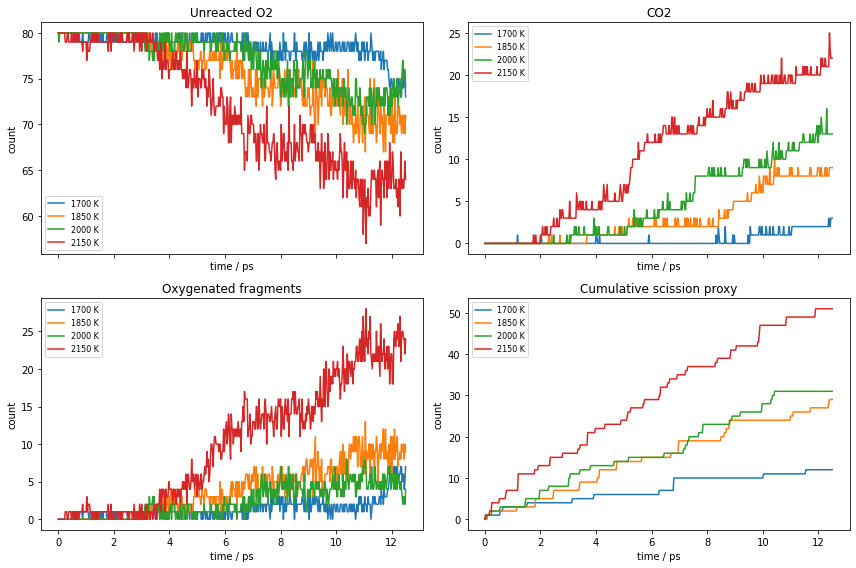
We can see a few interesting things from the figure above. Comparing when the curves in the different panels start to move gives us a qualitative timeline of the reaction sequence. If we look at the blue line in the top-left panel (“Unreacted O2” at 1700 K), it remains relatively flat at the beginning, indicating an induction period. Moving to the bottom-right panel (“Cumulative scission proxy”), notice how its stair-step lines begin to rise almost when the oxygen levels drop, illustrating how oxygen consumption triggers polymer fragmentation. Furthermore, if we check the CO2 panel (top-right), there is a time lag; these curves take much longer to take off compared to the immediate, early growth of the oxygenated fragments (bottom-left panel). This visual difference shows that deep mineralization into CO2 is a secondary process that requires the prior fragmentation of the polymer chain.
Compare metrics at different temperatures
When analyzing temperature trends, it is convenient to condense the trajectory data into a small set of representative metrics. This makes it easier to compare the short accelerated runs at a glance and to see which temperatures lead to the strongest overall oxidation and fragmentation within the same simulation time. Two of the most useful quantities here are peak_small_oxygenated and cumulative_scission_proxy. A high peak_small_oxygenated value suggests that the trajectory passes through a stage rich in short oxidized fragments, which is often a sign that larger oxygenated pieces are being broken into smaller intermediates. A high cumulative_scission_proxy means that fragmentation activity is strong over the full trajectory, not just in the final frame. Together they help distinguish a system that briefly forms oxidized fragments from one that keeps fragmenting throughout the run.
In the present figure, all three curves increase with temperature, so the short ReaxFF runs give a consistent phenomenological picture: high-temperature trajectories leave less unreacted oxygen, form more CO2, and generate more fragmentation. That makes the plot useful as a compact screening summary: if the goal is to identify a temperature window where oxidative degradation becomes much more aggressive, this panel does that immediately.
fig, ax = plt.subplots(figsize=(7, 4.5))
ax.plot(final_summary["temperature_K"], final_summary["final_co2"], marker="o", label="final CO2")
ax.plot(
    final_summary["temperature_K"],
    final_summary["cumulative_scission_proxy"],
    marker="o",
    label="cumulative scission proxy",
)
ax.plot(
    final_summary["temperature_K"],
    final_summary["peak_small_oxygenated"],
    marker="o",
    label="peak small oxygenated",
)
ax.set_xlabel("temperature / K")
ax.set_ylabel("count")
ax.set_title("Temperature effect in accelerated ReaxFF MD")
ax.legend()
fig.tight_layout()
ax;
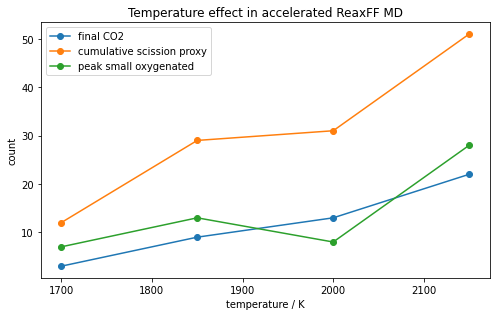
The diverging trends in this final graph perfectly illustrate how temperature alters competing mechanistic pathways. The slope of the orange line (cumulative scission proxy) is higher compared to the green line (peak small oxygenated). The visual separation between the lines shows how excess heat shreds the polymer backbone more quickly than the rate at which the system can sequentially oxidize the newly formed fragments.
Fit an apparent Arrhenius law to the degradation proxy
As a simple phenomenological approach, we can use an Arrhenius model to approximate the degradation rate over this temperature window:
or, equivalently,
For this analysis, k_app is not an elementary rate constant. Instead, a trajectory-level proxy is used, taken as cumulative_scission_proxy / time. The fit therefore gives an apparent activation energy and an apparent pre-exponential factor for the accelerated ReaxFF observable.
arr = final_summary.copy()
metric = "cumulative_scission_proxy"
arr["rate_proxy_per_ps"] = arr[metric] / arr["time_ps"].clip(lower=1e-12)
arr = arr[arr["rate_proxy_per_ps"] > 0].copy()

R = 8.31446261815324 # J/K/mol  Gas constant
J_to_kJ = 0.001
ps_to_s = 1.0e12

x = 1.0 / arr["temperature_K"].to_numpy(dtype=float)
y = np.log(arr["rate_proxy_per_ps"].to_numpy(dtype=float))
slope, intercept = np.polyfit(x, y, 1)

apparent_Ea_kJ_mol = -slope * R * J_to_kJ
apparent_A_per_ps = np.exp(intercept)
apparent_A_per_s = apparent_A_per_ps * ps_to_s

arr["fit_ln_rate"] = slope * x + intercept

print(f"Apparent Ea from {metric}: {apparent_Ea_kJ_mol:.1f} kJ/mol")
print(f"Apparent A from {metric}: {apparent_A_per_ps:.2f} ps^-1 ({apparent_A_per_s:.2e} s^-1)")

fig, ax = plt.subplots(figsize=(6.5, 4.2))
ax.scatter(x, y, label="rate proxy")
order = np.argsort(x)
ax.plot(x[order], arr["fit_ln_rate"].to_numpy()[order], label="linear fit")
ax.set_xlabel("1 / T / K$^{-1}$")
ax.set_ylabel("ln(proxy count ps$^{-1}$)")
ax.set_title("Apparent Arrhenius fit for the scission proxy")
ax.legend()
fig.tight_layout()
ax;
Apparent Ea from cumulative_scission_proxy: 90.3 kJ/mol
Apparent A from cumulative_scission_proxy: 640.45 ps^-1 (6.40e+14 s^-1)
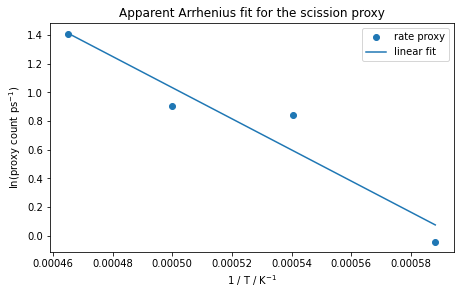
From the figure, we can see that the points are roughly linear, which matches our assumed model. By measuring the slope of the solid blue line, we can then calculate the activation energy (\(E_a\)). The experimental value falls within the uncertainty range of our calculated activation barrier. This shows how we can use fast, high-temperature simulations to qualitatively predict how slow material aging occurs the real world. Longer, low-temperature runs can in turn provide accurate quantitative results when required, though trend-based studies will benefit from the higher throughput offered by shorter MD simulations.
Continue in AMSmovie and ChemTraYzer2
This notebook has shown how to prepare trajectories and summarize system properties. Detailed reaction-event analysis, meanwhile, may be better performed interactively. A practical next step is to open one of the output trajectories in AMSmovie and use the ChemTraYzer2 reaction detection tools there.
Suggested workflow:
Open AMSmovie and use File → Open to load the trajectory output from the PLAMS folder.
In AMSmovie, choose MD Properties → Reaction Detection: ChemTraYzer2.
Inspect the detected reactions, populations, and individual reactive frames.
If you need finer reaction-event resolution, redo the simulation with a smaller trajectory sampling frequency.
See also
Python Script
#!/usr/bin/env python
# coding: utf-8

# ## Overview
#
# This notebook shows a PLAMS workflow for an accelerated thermo-oxidative degradation study with AMS/ReaxFF. The model system is a poly(acrylate) proxy oligomer mixed with molecular oxygen. The chemistry we want to observe is the onset of oxidation and fragmentation in an oxygen-rich polymer environment: oxygen should gradually be consumed, oxidized products (such as CO2) can appear, and the original polymer material can break into smaller oxygenated and hydrocarbon fragments.

# This example will show how to set up and analyze this type of reactive simulation. Simulations will be conducted at higher temperatures such that reactive events can be observed on short MD timescales. This enables qualitative analysis of the thermal dependency. (To accurately reproduce experimental degradation rates, longer simulations should be conducted at modest temperatures.)
#
# The main properties tracked during the simulation are the amount of `unreacted_oxygen` (`O2`), the amount of `co2`, the populations of `small_neutral`, `small_oxygenated`, `medium_oxygenated_fragment`, `oxygenated_fragment`, `parent_or_large_fragment`, and `hydrocarbon_fragment`, and a `scission_proxy` that acts as a qualitative indicator for fragmentation. These quantities are important because they summarize, in a compact way, how much oxidant is left, how far oxidation has progressed, and how strongly the original polymer-like material is being broken down.
#
# Each family of reaction products has been given a practical label:
#
# - `unreacted_oxygen`: molecules identified as `O2`.
# - `co2`: molecules identified as `CO2`.
# - `small_neutral`: very small neutral molecules tracked explicitly here as `CO`, `H2O`, or `H2`.
# - `small_oxygenated`: carbon-and-oxygen-containing fragments with at most 4 carbon atoms.
# - `medium_oxygenated_fragment`: oxygen-containing organic fragments with more than 4 carbon atoms but fewer than 8.
# - `oxygenated_fragment`: oxygen-containing fragments that do not fall into the previous carbon-based oxygenated groups.
# - `parent_or_large_fragment`: large carbon-containing fragments with at least 8 carbon atoms. This group includes material still close to the starting oligomer size.
# - `hydrocarbon_fragment`: carbon-containing fragments without oxygen that do not fall into the large-fragment group.
#
# The logic of the workflow is as follows: first build one representative polymer proxy oligomer, then place it in contact with explicit oxygen, and finally compare several temperatures. The oligomer structure is relaxed before packing so the reactive system starts from a sensible structure. Oxygen is added explicitly because the goal is to study oxidation chemistry rather than pure thermal fragmentation. Running four temperatures lets us see whether the same qualitative chemistry becomes stronger or faster as the temperature increases.
#
# Below, the time-dependent plots in the output show this effect on the elementary stages of the degradation process: a reduction in unreacted oxygen suggests more rapid oxidation, increasing CO2 suggests deeper oxidative breakdown, increasing oxygenated fragments point to oxidized intermediates, and a growing scission proxy suggests stronger fragmentation of the original material.
#
# Now, let's start!

# ## Imports and global settings

import matplotlib.pyplot as plt
import numpy as np
import pandas as pd

from scm.plams import AMSJob, JobRunner, Settings, config, from_smiles, packmol, plot_image_grid, view


# ## Practical notes
#
# - For systems below 1000 atoms, it is most efficient to run ReaxFF in serial. Each MD job therefore uses `nproc = 1` and `OMP_NUM_THREADS = 1`.
# - For parallelization, simulations at each temperature are run concurrently through the PLAMS `JobRunner`.
# - The trajectories are deliberately short and accelerated. Increase the number of MD steps for a longer study, or decrease the trajectory sampling frequency if you want finer reaction-event resolution.

# ## Reusable helper functions
#
# The helper functions for this notebook live in the local file `thermo_oxidative_polyacrylate_reaxff_helpers.py`.
#
# They convert AMS molecule histories into tables, group species into the product families, and prepare representative molecules for display.
#
# You can continue the notebook without getting into the details of those functions. Only users who want to inspect or modify the implementation need to open the helper file.

# dependency: {} thermo_oxidative_polyacrylate_reaxff_helpers.py

from thermo_oxidative_polyacrylate_reaxff_helpers import (
    add_degradation_metrics,
    find_representative_molecule,
    molecule_counts_from_ams_results,
    prepare_molecule_for_display,
    species_family,
    summarize_product_families,
)


# Note that the product-family labels introduced in the overview are only used as analysis categories. They are useful for comparing temperature trends, but they should not be interpreted as a complete mechanistic description of every reaction event in the trajectory.

# ## Build the poly(acrylate) proxy oligomer
#
# We begin by building one poly(acrylate) proxy oligomer from SMILES. This oligomer is the organic material whose oxidative degradation we want to follow later in the reactive box. Before mixing it with oxygen, we run a short ReaxFF geometry optimization so the oligomer starts from a reasonable, clash-free structure. The goal here is not an exhaustive conformer search, but simply to create a sensible building block for the packed simulation cell.

config.default_jobrunner = JobRunner(parallel=True, maxjobs=4)
config.default_jobmanager.hashing = None

polymer = from_smiles("CC(C(=O)OC)CC(C(=O)OCC)CC(C(=O)OCCCC)CC(C(=O)OC)CC(C(=O)OCC)CC(C(=O)OCCCC)")
oxygen = from_smiles("O=O")

print("Oligomer atoms:", len(polymer))
print("O2 atoms:", len(oxygen))
print("Target total atoms:", 8 * len(polymer) + 80 * len(oxygen))

go_settings = Settings()
go_settings.input.ReaxFF.ForceField = "CHO.ff"
go_settings.input.ams.Task = "GeometryOptimization"
go_settings.runscript.nproc = 1
go_settings.runscript.preamble_lines = ["export OMP_NUM_THREADS=1"]

go_job = AMSJob(name="00_clean_polyacrylate_oligomer", molecule=polymer, settings=go_settings)
go_results = go_job.run();

if go_results.ok():
    polymer_clean = go_results.get_main_molecule()
    print("Oligomer cleanup ok: True")
else:
    polymer_clean = polymer
    print("Oligomer cleanup ok: False")
    print("Continuing with the SMILES-built oligomer.")

view(polymer_clean, direction="along_pca3", picture_path="picture1.png")


# ## Pack the polymer and oxygen reactants
#
# We now add explicit oxygen molecules to build the periodic simulation box. This step defines the reactive environment: the oligomers provide the organic material and O2 provides the oxidant. The chosen composition keeps the system close to the 1000-atom scale, which is practical for short ReaxFF trajectories while still being large enough to display competing oxidation and fragmentation events.

box = packmol(
    molecules=[polymer_clean, oxygen],
    n_molecules=[8, 80],
    density=0.65,
    seed=100,
)

view(box, direction="tilt_z", picture_path="picture2.png")


# ## Run short ReaxFF MD simulations at several temperatures
#
# We run the same reactive system at four temperatures so that we can compare how strongly the oxidation and fragmentation chemistry is activated as the temperature increases. Each simulation uses one core, while PLAMS runs the different temperatures concurrently through a parallel `JobRunner`. The trajectories are intentionally short so the notebook remains practical, but they are still long enough to reveal differences in oxygen consumption, fragment formation, and overall degradation activity. (A fixed AMS random seed is assigned to make this notebook reproducible.)
#
# The MD setup is deliberately simple. Random initial velocities are drawn at the target temperature, and a Berendsen thermostat is used to keep each trajectory close to that temperature during these short reactive runs. This is convenient here because the goal is comparative screening of oxidation activity at fixed temperature, not rigorous sampling of a particular statistical ensemble. The thermostat time constant `Tau = 100` fs gives fairly gentle coupling: it is short enough to control the temperature over a 12.5 ps run, but not so tight that every fast vibrational fluctuation is immediately dampened away.

jobs = {}
for temperature in [1700, 1850, 2000, 2150]:

    settings = Settings()
    settings.input.ReaxFF.ForceField = "CHO.ff"
    settings.input.ams.Task = "MolecularDynamics"
    settings.input.ams.Properties.BondOrders = "Yes"
    settings.input.ams.RNGSeed = [10000 + temperature]
    md = settings.input.ams.MolecularDynamics
    md.NSteps = 50000
    md.TimeStep = 0.25
    md.InitialVelocities.Type = "Random"
    md.InitialVelocities.Temperature = float(temperature)
    md.Thermostat.Type = "Berendsen"
    md.Thermostat.Temperature = float(temperature)
    md.Thermostat.Tau = 100
    md.Trajectory.SamplingFreq = 100
    md.Trajectory.WriteMolecules = "Yes"
    md.Trajectory.WriteBonds = "Yes"
    md.Trajectory.WriteCharges = "Yes"
    settings.runscript.nproc = 1
    settings.runscript.preamble_lines = ["export OMP_NUM_THREADS=1"]

    job = AMSJob(
        name=f"MD_T{temperature}K",
        molecule=box,
        settings=settings,
    )
    jobs[temperature] = job

for job in jobs.values():
    job.run()

for temperature, job in jobs.items():
    if not job.results.ok():
        raise RuntimeError(f"MD failed at {temperature} K")


# ## Analyze the trajectories
#
# The next section converts each trajectory into a compact table of family populations and then extracts a few summary metrics. Properties labeled `final_*` indicate values for the final frame of a trajectory, while `peak_*` indicates the largest value reached anywhere along that trajectory.
#
# This distinction matters because some species are transient. For example, `final_small_oxygenated` tells you how many short oxygen-containing fragments are still present at the end, whereas `peak_small_oxygenated` tells you whether the trajectory passed through a stage with stronger buildup of such intermediates even if they were later consumed. Likewise, `final_scission_proxy` is only the instantaneous fragmentation signal in the last frame, while `cumulative_scission_proxy` adds that signal over time and is therefore a more robust indicator of how much fragmentation activity occurred during the whole run.
#
# The `final_summary` table is important because it condenses the four short MD trajectories into a form that is easy to compare across temperature. It does not replace the time-dependent plots, but it makes it much easier to spot which temperatures leave more oxygen unreacted, produce more CO2, or generate stronger overall fragmentation. Notice that we also store one representative molecule for each family while scanning the trajectories, so those categories can be illustrated later with actual fragments from the MD history.

all_family_rows = []
final_rows = []
representative_molecules = {}
representative_formulas = {}

time_step = 0.25 # ps
sampling_freq = 100
fs_to_ps = 0.001

for temperature, job in jobs.items():
    counts = molecule_counts_from_ams_results(job.results)
    counts["time_ps"] = ( (counts["frame"].astype(int) - 1) * time_step * sampling_freq ) * fs_to_ps
    families = summarize_product_families(counts)
    families = add_degradation_metrics(families)
    families["temperature_K"] = temperature
    all_family_rows.append(families)

    species_columns = [column for column in counts.columns if column not in {"frame", "time_ps"}]
    for species in species_columns:
        family = species_family(species)
        if family not in representative_molecules and counts[species].max() > 0:
            molecule = find_representative_molecule(job.results, species)
            if molecule is not None:
                representative_molecules[family] = molecule
                representative_formulas[family] = species

    final_row = families.iloc[-1]
    peak_row = families.max(numeric_only=True)
    final_rows.append(
        {
            "temperature_K": temperature,
            "time_ps": final_row["time_ps"],
            "final_unreacted_oxygen": final_row["unreacted_oxygen"],
            "final_co2": final_row["co2"],
            "peak_co2": peak_row["co2"],
            "final_small_oxygenated": final_row["small_oxygenated"],
            "peak_small_oxygenated": peak_row["small_oxygenated"],
            "final_medium_oxygenated": final_row["medium_oxygenated_fragment"],
            "peak_medium_oxygenated": peak_row["medium_oxygenated_fragment"],
            "final_scission_proxy": final_row["scission_proxy"],
            "cumulative_scission_proxy": final_row["cumulative_scission_proxy"],
        }
    )

family_long = pd.concat(all_family_rows, ignore_index=True)
final_summary = pd.DataFrame(final_rows).sort_values("temperature_K")


final_summary[[
    "temperature_K",
    "peak_co2",
    "peak_small_oxygenated",
    "peak_medium_oxygenated",
    "cumulative_scission_proxy"]]


final_summary[[
    "temperature_K",
    "final_unreacted_oxygen",
    "final_co2",
    "final_small_oxygenated",
    "final_medium_oxygenated",
    "final_scission_proxy"]]


# In the current run, the `final_summary` table already shows a clean temperature trend. The amount of unreacted `O2` decreases as temperature increases, while the final CO2 and the cumulative scission proxy increase. The increase in `small_oxygenated` fragments is also strong, especially at the highest temperature. Taken together, this suggests a progression from relatively mild oxidation to much more extensive oxidative fragmentation as temperature increases.

# ## Representative molecules for each product family
#
# It is useful to connect the family labels to actual fragments found in the trajectories. The panel below shows one representative molecule for each family that appeared in the current MD runs.
#
# These figures are helpful because they anchor the abstract labels to concrete structures. They let you see, for example, whether a family contains oligomer-like material, short oxygenated chain fragments, or small stable products such as `CO2`. This is still only an illustrative snapshot: each family can contain many different structures, especially at higher temperature, so the panel should be read as a visual guide rather than a complete mechanistic inventory.
#
# Some families may be absent in a short trajectory set, so only the families that were actually found are shown.

family_images = {
    f"{family}\n{representative_formulas[family]}": view(
        prepare_molecule_for_display(representative_molecules[family]), width=220, height=180, guess_bonds=False
    )
    for family in representative_molecules
}
plot_image_grid(family_images, rows=2, save_path="picture3.png");


# ## Plot the time-dependent trends
#
# Here we make a figure that shows how a few coarse observables evolve over time for each temperature: the remaining oxygen, the amount of `CO2`, the population of oxygenated fragments, and the cumulative scission proxy. A faster drop in unreacted oxygen suggests more rapid oxidation, increasing `CO2` points to deeper oxidative breakdown, rising oxygenated-fragment counts indicate the build-up of oxidized intermediates, and a growing scission proxy signals stronger fragmentation of the original polymer material.

fig, axes = plt.subplots(2, 2, figsize=(12, 8), sharex=True)
axes = axes.ravel()

for temperature, group in family_long.groupby("temperature_K"):
    axes[0].plot(group["time_ps"], group["unreacted_oxygen"], label=f"{temperature} K")
    axes[1].plot(group["time_ps"], group["co2"], label=f"{temperature} K")
    axes[2].plot(
        group["time_ps"],
        group["small_oxygenated"] + group["medium_oxygenated_fragment"],
        label=f"{temperature} K",
    )
    axes[3].plot(group["time_ps"], group["cumulative_scission_proxy"], label=f"{temperature} K")

axes[0].set_title("Unreacted O2")
axes[1].set_title("CO2")
axes[2].set_title("Oxygenated fragments")
axes[3].set_title("Cumulative scission proxy")

for ax in axes:
    ax.set_xlabel("time / ps")
    ax.set_ylabel("count")
    ax.legend(fontsize=8)

fig.tight_layout()
axes;
import matplotlib.pyplot as plt
plt.gcf().savefig("picture4.png")


# We can see a few interesting things from the figure above. Comparing when the curves in the different panels start to move gives us a qualitative timeline of the reaction sequence. If we look at the blue line in the top-left panel ("Unreacted O2" at 1700 K), it remains relatively flat at the beginning, indicating an induction period. Moving to the bottom-right panel ("Cumulative scission proxy"), notice how its stair-step lines begin to rise almost when the oxygen levels drop, illustrating how oxygen consumption triggers polymer fragmentation. Furthermore, if we check the CO2 panel (top-right), there is a time lag; these curves take much longer to take off compared to the immediate, early growth of the oxygenated fragments (bottom-left panel). This visual difference shows that deep mineralization into CO2 is a secondary process that requires the prior fragmentation of the polymer chain.

# ## Compare metrics at different temperatures
#
# When analyzing temperature trends, it is convenient to condense the trajectory data into a small set of representative metrics. This makes it easier to compare the short accelerated runs at a glance and to see which temperatures lead to the strongest overall oxidation and fragmentation within the same simulation time. Two of the most useful quantities here are `peak_small_oxygenated` and `cumulative_scission_proxy`. A high `peak_small_oxygenated` value suggests that the trajectory passes through a stage rich in short oxidized fragments, which is often a sign that larger oxygenated pieces are being broken into smaller intermediates. A high `cumulative_scission_proxy` means that fragmentation activity is strong over the full trajectory, not just in the final frame. Together they help distinguish a system that briefly forms oxidized fragments from one that keeps fragmenting throughout the run.
#
# In the present figure, all three curves increase with temperature, so the short ReaxFF runs give a consistent phenomenological picture: high-temperature trajectories leave less unreacted oxygen, form more `CO2`, and generate more fragmentation. That makes the plot useful as a compact screening summary: if the goal is to identify a temperature window where oxidative degradation becomes much more aggressive, this panel does that immediately.

fig, ax = plt.subplots(figsize=(7, 4.5))
ax.plot(final_summary["temperature_K"], final_summary["final_co2"], marker="o", label="final CO2")
ax.plot(
    final_summary["temperature_K"],
    final_summary["cumulative_scission_proxy"],
    marker="o",
    label="cumulative scission proxy",
)
ax.plot(
    final_summary["temperature_K"],
    final_summary["peak_small_oxygenated"],
    marker="o",
    label="peak small oxygenated",
)
ax.set_xlabel("temperature / K")
ax.set_ylabel("count")
ax.set_title("Temperature effect in accelerated ReaxFF MD")
ax.legend()
fig.tight_layout()
ax;
ax.figure.savefig("picture5.png")


# The diverging trends in this final graph perfectly illustrate how temperature alters competing mechanistic pathways. The slope of the orange line (cumulative scission proxy) is higher compared to the green line (peak small oxygenated). The visual separation between the lines shows how excess heat shreds the polymer backbone more quickly than the rate at which the system can sequentially oxidize the newly formed fragments.

# ## Fit an apparent Arrhenius law to the degradation proxy
#
# As a simple phenomenological approach, we can use an Arrhenius model to approximate the degradation rate over this temperature window:
#
# $$k_{\mathrm{app}}(T) = A_{\mathrm{app}} e^{-E_{a,\mathrm{app}} / RT}$$
#
# or, equivalently,
#
# $$\ln k_{\mathrm{app}} = \ln A_{\mathrm{app}} - \left(\frac{E_{a,\mathrm{app}}}{R}\right)\frac{1}{T}$$
#
# For this analysis, `k_app` is not an elementary rate constant. Instead, a trajectory-level proxy is used, taken as `cumulative_scission_proxy / time`. The fit therefore gives an *apparent* activation energy and an *apparent* pre-exponential factor for the accelerated ReaxFF observable.

arr = final_summary.copy()
metric = "cumulative_scission_proxy"
arr["rate_proxy_per_ps"] = arr[metric] / arr["time_ps"].clip(lower=1e-12)
arr = arr[arr["rate_proxy_per_ps"] > 0].copy()

R = 8.31446261815324 # J/K/mol  Gas constant
J_to_kJ = 0.001
ps_to_s = 1.0e12

x = 1.0 / arr["temperature_K"].to_numpy(dtype=float)
y = np.log(arr["rate_proxy_per_ps"].to_numpy(dtype=float))
slope, intercept = np.polyfit(x, y, 1)

apparent_Ea_kJ_mol = -slope * R * J_to_kJ
apparent_A_per_ps = np.exp(intercept)
apparent_A_per_s = apparent_A_per_ps * ps_to_s

arr["fit_ln_rate"] = slope * x + intercept

print(f"Apparent Ea from {metric}: {apparent_Ea_kJ_mol:.1f} kJ/mol")
print(f"Apparent A from {metric}: {apparent_A_per_ps:.2f} ps^-1 ({apparent_A_per_s:.2e} s^-1)")

fig, ax = plt.subplots(figsize=(6.5, 4.2))
ax.scatter(x, y, label="rate proxy")
order = np.argsort(x)
ax.plot(x[order], arr["fit_ln_rate"].to_numpy()[order], label="linear fit")
ax.set_xlabel("1 / T / K$^{-1}$")
ax.set_ylabel("ln(proxy count ps$^{-1}$)")
ax.set_title("Apparent Arrhenius fit for the scission proxy")
ax.legend()
fig.tight_layout()
ax;
ax.figure.savefig("picture6.png")


# From the figure, we can see that the points are roughly linear, which matches our assumed model. By measuring the slope of the solid blue line, we can then calculate the activation energy ($E_a$). The experimental value falls within the uncertainty range of our calculated activation barrier. This shows how we can use fast, high-temperature simulations to qualitatively predict how slow material aging occurs the real world. Longer, low-temperature runs can in turn provide accurate quantitative results when required, though trend-based studies will benefit from the higher throughput offered by shorter MD simulations.

# ## Continue in AMSmovie and ChemTraYzer2
#
# This notebook has shown how to prepare trajectories and summarize system properties. Detailed reaction-event analysis, meanwhile, may be better performed interactively. A practical next step is to open one of the output trajectories in AMSmovie and use the ChemTraYzer2 reaction detection tools there.
#
# Suggested workflow:
#
# 1. Open AMSmovie and use **File → Open** to load the trajectory output from the PLAMS folder.
# 2. In AMSmovie, choose **MD Properties → Reaction Detection: ChemTraYzer2**.
# 3. Inspect the detected reactions, populations, and individual reactive frames.
# 4. If you need finer reaction-event resolution, redo the simulation with a smaller trajectory sampling frequency.
Required additional files
thermo_oxidative_polyacrylate_reaxff_helpers.py
from collections import Counter
import re
from typing import Any, Optional

import pandas as pd


def molecule_counts_from_ams_results(results: Any) -> pd.DataFrame:
    """Build a species-count table from the AMS molecule history.

    The AMS molecule analysis stored in ``ams.rkf`` assigns an integer type to
    each molecule in every saved frame. This function maps those type IDs back
    to their molecular formulas and counts how many times each formula appears
    in each frame.

    Parameters
    ----------
    results
        PLAMS results object for an AMS MD job with molecule history present.

    Returns
    -------
    pandas.DataFrame
        Table with one row per saved frame. The ``frame`` column stores the
        frame index and the remaining columns store species counts.
    """
    n_molecule_types = int(results.readrkf("Molecules", "Num molecules"))
    names = {
        i: results.readrkf("Molecules", f"Molecule name {i}")
        for i in range(1, n_molecule_types + 1)
    }
    type_history = results.get_history_property("Mols.Type")
    rows = []
    for frame, mol_types in enumerate(type_history, start=1):
        counter = Counter(int(x) for x in mol_types)
        row = {"frame": frame}
        for mol_type_id, name in names.items():
            row[name] = int(counter[mol_type_id])
        rows.append(row)
    return pd.DataFrame(rows).fillna(0)


def species_family(species: str) -> str:
    """Assign a molecular formula to one analysis family.

    Parameters
    ----------
    species
        Molecular formula as reported by AMS, for example ``"O2"`` or
        ``"C3H6O2"``.

    Returns
    -------
    str
        Name of the product family used throughout the notebook.
    """
    text = str(species).upper().replace(" ", "")
    counts = {el: int(n or 1) for el, n in re.findall(r"([A-Z][a-z]?)([0-9]*)", str(species))}
    carbon = counts.get("C", 0)
    oxygen = counts.get("O", 0)
    if text == "O2":
        return "unreacted_oxygen"
    if text == "CO2":
        return "co2"
    if text in {"CO", "H2O", "H2"}:
        return "small_neutral"
    if carbon > 0 and oxygen > 0 and carbon <= 4:
        return "small_oxygenated"
    if carbon >= 8:
        return "parent_or_large_fragment"
    if carbon > 0 and oxygen > 0:
        return "medium_oxygenated_fragment"
    if oxygen > 0:
        return "oxygenated_fragment"
    return "hydrocarbon_fragment"


def summarize_product_families(counts: pd.DataFrame) -> pd.DataFrame:
    """Aggregate per-species counts into broader product-family populations.

    Parameters
    ----------
    counts
        Species-count table produced from the AMS molecule history.

    Returns
    -------
    pandas.DataFrame
        Copy of the frame/time columns together with one column per product
        family defined by :func:`species_family`.
    """
    value_cols = [c for c in counts.columns if c not in {"frame", "time_ps"}]
    out = counts[[c for c in counts.columns if c in {"frame", "time_ps"}]].copy()
    families = [
        "unreacted_oxygen",
        "co2",
        "small_neutral",
        "small_oxygenated",
        "medium_oxygenated_fragment",
        "oxygenated_fragment",
        "parent_or_large_fragment",
        "hydrocarbon_fragment",
    ]
    for family in families:
        members = [c for c in value_cols if species_family(c) == family]
        out[family] = counts[members].sum(axis=1) if members else 0
    return out


def add_degradation_metrics(family_summary: pd.DataFrame) -> pd.DataFrame:
    """Add coarse degradation descriptors to a family-summary table.

    The main derived quantity is ``scission_proxy``, which measures the
    increase in fragment-like populations relative to the initial frame. Its
    cumulative version is used in the notebook as a simple monotonic indicator
    of fragmentation activity.

    Parameters
    ----------
    family_summary
        Table containing the product-family populations as a function of frame
        or time.

    Returns
    -------
    pandas.DataFrame
        Copy of the input table with additional degradation-proxy columns.
    """
    out = family_summary.copy()
    fragment_cols = [
        "small_oxygenated",
        "medium_oxygenated_fragment",
        "oxygenated_fragment",
        "hydrocarbon_fragment",
        "parent_or_large_fragment",
    ]
    total = sum(out[col].astype(float) for col in fragment_cols if col in out)
    baseline = float(total.iloc[0]) if len(out) else 0.0
    out["scission_proxy"] = (total - baseline).clip(lower=0)
    out["cumulative_scission_proxy"] = out["scission_proxy"].cummax()
    out["cumulative_co2"] = out["co2"].cummax() if "co2" in out else 0
    return out


def find_representative_molecule(results: Any, target_formula: str) -> Optional[Any]:
    """Return one fragment from the trajectory matching a target formula.

    Parameters
    ----------
    results
        PLAMS results object for an AMS MD job.
    target_formula
        Molecular formula to search for in the separated fragments of each
        stored frame.

    Returns
    -------
    optional
        The first matching molecule fragment found in the trajectory, or
        ``None`` if the formula never appears.
    """
    n_steps = int(results.readrkf("History", "nEntries"))
    for step in range(1, n_steps + 1):
        frame = results.get_history_molecule(step)
        for fragment in frame.separate():
            if fragment.get_formula() == target_formula:
                return fragment
    return None


def prepare_molecule_for_display(molecule: Any) -> Any:
    """Prepare a molecule fragment for cleaner notebook visualization.

    The function reconnects periodic fragments when needed, removes lattice
    information, centers the molecule, and aligns it with its principal axes so
    representative-family images are easier to compare.

    Parameters
    ----------
    molecule
        Molecule object to prepare for display.

    Returns
    -------
    Any
        Copy of the input molecule with visualization-oriented cleanup
        applied.
    """
    display_molecule = molecule.copy()
    if display_molecule.lattice:
        display_molecule.map_atoms_to_bonds()
    display_molecule.lattice = []
    for bond in display_molecule.bonds:
        if "suffix" in bond.properties:
            del bond.properties.suffix
    center = display_molecule.get_center_of_mass()
    display_molecule.translate(tuple(-value for value in center))
    if len(display_molecule) > 1:
        _, principal_axes = display_molecule.get_moments_of_inertia(eigen_vectors=True)
        display_molecule.rotate(principal_axes)
    return display_molecule