
Active Learning: Single-Molecule Setup and Run with QET
Set up a minimal Simple Active Learning workflow for finetuning the QET universal potential for a small organic molecule.
Initial imports
from scm.simple_active_learning import SimpleActiveLearningJob
import scm.plams as plams
from scm.base import ChemicalSystem
Input system
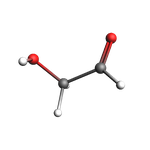
mol = plams.from_smiles("OCC=O", forcefield="uff")
for at in mol:
    at.properties = {}
plams.view(mol, direction="along_pca3", width=150, height=150)
Reference engine settings
For time reasons we use the UFF force field as the reference method. Typically you would instead train to DFT using ADF, BAND, or Quantum ESPRESSO.
ref_s = plams.Settings()
ref_s.input.ForceField.Type = "UFF"
ref_s.runscript.nproc = 1
print(plams.AMSJob(settings=ref_s).get_input())
Engine ForceField
  Type UFF
EndEngine
Molecular dynamics settings
Here, we use the convenient AMSNVTJob recipe to easily initialize sone MD settings.
md_s = plams.AMSNVTJob(temperature=300, timestep=0.5, nsteps=10000, thermostat="Berendsen", tau=50).settings
print(plams.AMSJob(settings=md_s).get_input())
MolecularDynamics
  BinLog
    DipoleMoment False
    PressureTensor False
    Time False
  End
  CalcPressure False
  Checkpoint
    Frequency 1000
  End
  InitialVelocities
    Temperature 300
    Type Random
  End
  NSteps 10000
  Thermostat
    Tau 50
    Temperature 300
    Type Berendsen
  End
  TimeStep 0.5
  Trajectory
    SamplingFreq 100
    WriteBonds True
    WriteCharges True
    WriteEngineGradients False
    WriteMolecules True
    WriteVelocities True
  End
End

Task MolecularDynamics
ParAMS ML Training settings
This example fine-tunes the MatGL QET-PBE-2025 foundation model. To use TensorNet, set it to TensorNet-PBE-M-2025. The corresponding r2SCAN models are selected in the same way. (Technical note: When using SimpleActiveLearningJob the ParAMS settings go under input.ams. When using ParAMSJob the settings instead simply go under input. See the ParAMS Python tutorials.)
ml_s = plams.Settings()
ml_s.input.ams.MachineLearning.Backend = "MatGL"
ml_s.input.ams.MachineLearning.CommitteeSize = 1
ml_s.input.ams.MachineLearning.MaxEpochs = 100
# fine-tuning MatGL (QET/TensorNet) requires AMS2027+
ml_s.input.ams.MachineLearning.MatGL.Model = "QET-PBE-2025"

#ml_s.input.ams.MachineLearning.MatGL.LearningRate = 0.0001
#ml_s.input.ams.MachineLearning.MatGL.LearningRateSchedule.Type = "Constant"

# early stopping requires AMS2027+
ml_s.input.ams.MachineLearning.EarlyStopping.Enabled = "Yes"
# use a low early-stopping patience since MaxEpochs is quite small in this example
ml_s.input.ams.MachineLearning.EarlyStopping.Patience = 40

print(SimpleActiveLearningJob(settings=ml_s).get_input())
MachineLearning
  Backend MatGL
  CommitteeSize 1
  EarlyStopping
    Enabled True
    Patience 40
  End
  MatGL
    Model QET-PBE-2025
  End
  MaxEpochs 100
End
Active learning settings
al_s = plams.Settings()
al_s.input.ams.ActiveLearning.Steps.Type = "Geometric"
al_s.input.ams.ActiveLearning.Steps.Geometric.Start = 10  # 10 MD frames
al_s.input.ams.ActiveLearning.Steps.Geometric.NumSteps = 5  # 10 AL steps
print(SimpleActiveLearningJob(settings=al_s).get_input())
ActiveLearning
  Steps
    Geometric
      NumSteps 5
      Start 10
    End
    Type Geometric
  End
End
Simple Active Learning Job
settings = ref_s + md_s + ml_s + al_s
job = SimpleActiveLearningJob(settings=settings, molecule=mol, name="sal")
print(job.get_input())
ActiveLearning
  Steps
    Geometric
      NumSteps 5
      Start 10
    End
    Type Geometric
  End
End
MachineLearning
  Backend MatGL
  CommitteeSize 1
  EarlyStopping
    Enabled True
    Patience 40
  End
  MatGL
    Model QET-PBE-2025
  End
  MaxEpochs 100
End
MolecularDynamics
  BinLog
    DipoleMoment False
    PressureTensor False
... output trimmed ....
EndEngine

System
  Atoms
              O       1.4148380879       1.2995032367       0.0552066866
              C       1.0045475756       0.1523546613       0.1288771758
              C      -0.3482031043      -0.2022667497      -0.4064331140
              O      -1.3422954055       0.5174377380       0.2698992152
              H       1.6276347522      -0.6127588237       0.5803290933
              H      -0.3900536454       0.0512247640      -1.4865055633
              H      -0.5220879195      -1.2970056162      -0.3025647644
              H      -1.4443803409       0.0915107896       1.1611912709
  End
  BondOrders
     1 2 2.0
     2 3 1.0
     3 4 1.0
     2 5 1.0
     3 6 1.0
     3 7 1.0
     4 8 1.0
  End
  Charge 0
End
Run the job
job.run(watch=True);
[12.08|12:24:29] JOB sal STARTED
[12.08|12:24:29] JOB sal RUNNING
[12.08|12:24:30] Simple Active Learning 2026.201,  Nodes: 1, Procs: 1
[12.08|12:24:31] Composition of main system: C2H4O2
[12.08|12:24:31] All REFERENCE calculations will be performed with the following ForceField engine:
[12.08|12:24:31]

Engine ForceField
  Type UFF
EndEngine


[12.08|12:24:31] The following are the settings for the to-be-trained MACHINE LEARNING model:
[12.08|12:24:31]
MachineLearning
  Backend MatGL
  CommitteeSize 1
  EarlyStopping
    Enabled True
    Patience 40
  End
  MatGL
    Model QET-PBE-2025
  End
  MaxEpochs 100
... output trimmed ....
[12.08|12:38:29]     2        3 SUCCESS  Accurate                                         56                         0.3735
[12.08|12:38:29]     3        1 SUCCESS  Accurate                                        316                         0.4624
[12.08|12:38:29]     4        1 FAILED   Inaccurate                                     1778                         0.8213
[12.08|12:38:29]     4        2 FAILED   Inaccurate                                     1778                         0.6959
[12.08|12:38:29]     4        3 SUCCESS  Accurate                                       1778                         0.2892
[12.08|12:38:29]     5        1 SUCCESS  Accurate                                      10000                         0.5062
[12.08|12:38:29] --- End summary ---
[12.08|12:38:29]
[12.08|12:38:29] The engine settings for the final trained ML engine are:
[12.08|12:38:29]

Engine MLPotential
  Backend MatGL
  Model Custom
  ParameterDir /path/to/plams_workdir.006/sal/step4_attempt2_training/results/optimization/matgl/matgl
EndEngine


[12.08|12:38:29] Active learning finished!
[12.08|12:38:29] Rerunning the simulation with the final parameters...
[12.08|12:42:11] Copying final_production_simulation/ams.rkf to ams.rkf
[12.08|12:42:11] Goodbye!
[12.08|12:42:11] JOB sal FINISHED
[12.08|12:42:11] JOB sal SUCCESSFUL
See also
Python Script
#!/usr/bin/env python
# coding: utf-8

# ## Initial imports

from scm.simple_active_learning import SimpleActiveLearningJob
import scm.plams as plams
from scm.base import ChemicalSystem


# ## Input system

mol = plams.from_smiles("OCC=O", forcefield="uff")
for at in mol:
    at.properties = {}
plams.view(mol, direction="along_pca3", width=150, height=150, picture_path="picture1.png")


# ## Reference engine settings
# For time reasons we use the UFF force field as the reference method. Typically you would instead train to DFT using ADF, BAND, or Quantum ESPRESSO.

ref_s = plams.Settings()
ref_s.input.ForceField.Type = "UFF"
ref_s.runscript.nproc = 1


print(plams.AMSJob(settings=ref_s).get_input())


# ## Molecular dynamics settings
# Here, we use the convenient ``AMSNVTJob`` recipe to easily initialize sone MD settings.

md_s = plams.AMSNVTJob(temperature=300, timestep=0.5, nsteps=10000, thermostat="Berendsen", tau=50).settings


print(plams.AMSJob(settings=md_s).get_input())


# ## ParAMS ML Training settings
#
# This example fine-tunes the MatGL ``QET-PBE-2025`` foundation model. To use TensorNet, set it to ``TensorNet-PBE-M-2025``. The corresponding r2SCAN models are selected in the same way.
# (Technical note: When using ``SimpleActiveLearningJob`` the ParAMS settings go under ``input.ams``. When using ``ParAMSJob`` the settings instead simply go under ``input``. See the ParAMS Python tutorials.)

ml_s = plams.Settings()
ml_s.input.ams.MachineLearning.Backend = "MatGL"
ml_s.input.ams.MachineLearning.CommitteeSize = 1
ml_s.input.ams.MachineLearning.MaxEpochs = 100
# fine-tuning MatGL (QET/TensorNet) requires AMS2027+
ml_s.input.ams.MachineLearning.MatGL.Model = "QET-PBE-2025"

#ml_s.input.ams.MachineLearning.MatGL.LearningRate = 0.0001
#ml_s.input.ams.MachineLearning.MatGL.LearningRateSchedule.Type = "Constant"

# early stopping requires AMS2027+
ml_s.input.ams.MachineLearning.EarlyStopping.Enabled = "Yes"
# use a low early-stopping patience since MaxEpochs is quite small in this example
ml_s.input.ams.MachineLearning.EarlyStopping.Patience = 40

print(SimpleActiveLearningJob(settings=ml_s).get_input())


# ## Active learning settings

al_s = plams.Settings()
al_s.input.ams.ActiveLearning.Steps.Type = "Geometric"
al_s.input.ams.ActiveLearning.Steps.Geometric.Start = 10  # 10 MD frames
al_s.input.ams.ActiveLearning.Steps.Geometric.NumSteps = 5  # 10 AL steps
print(SimpleActiveLearningJob(settings=al_s).get_input())


# ## Simple Active Learning Job

settings = ref_s + md_s + ml_s + al_s
job = SimpleActiveLearningJob(settings=settings, molecule=mol, name="sal")
print(job.get_input())


# ## Run the job

job.run(watch=True);