
Preparing AMS Input with scm.inputs
Build validated AMS driver and engine input with typed scm.inputs models.
This example covers keys, nested and repeated blocks, free-form blocks, headers,
unit conversion, model composition, and conversion to and from AMS text input.
Downloads: Notebook | Script ?
Requires: AMS2027 or later
Related examples
Related tutorials
Related documentation
Why typed input models?
The AMS manuals describe input as keys organized in blocks. The classes in scm.inputs mirror that familiar text structure: every program has its own Pydantic model, and legal Python field names use the same spelling as the corresponding AMS key or block.
Unlike a generic nested dictionary, a typed model tells your editor which blocks and keys exist, offers completion for allowed values, shows keyword documentation on hover, and validates assignments. At the same time, it remains easy to print ordinary AMS text or parse text back into a model.
This example is only about preparing input: it does not run jobs.
from scm.base import ChemicalSystem
from scm.inputs import ADF, AMS, BAND, DFTB, HeaderedFreeBlock, Hybrid, QuantumEspresso
from scm.plams import plot_image_grid, view
Keys, fixed blocks, and engines
Create an AMS model for the driver input. Fixed blocks such as GeometryOptimization, Convergence, and Properties are always available for natural chained access, but an untouched block is not written to the text input.
The engine is an instance of its concrete model. After assigning DFTB, an editor such as VS Code with Pylance knows that input_model.Engine is a DFTB object and completes DFTB-specific fields.
ams = AMS()
ams.Task = "GeometryOptimization"
ams.GeometryOptimization.Convergence.Gradients = 1.0e-4
ams.Properties.NormalModes = True

ams.Engine = DFTB()
ams.Engine.Model = "GFN1-xTB"

print(ams.to_input())
Task GeometryOptimization
Engine DFTB
    Model GFN1-xTB
EndEngine
Properties
    NormalModes True
End
GeometryOptimization
    Convergence
        Gradients 0.0001
    End
End
The generated text contains only fields that were explicitly set, or blocks containing such fields. Definition order is preserved. str(input_model) is equivalent to input_model.to_input(), so a plain print(input_model) would have worked too. For specialized cases, input_model.to_input(only={"GeometryOptimization"}) serializes only the selected top-level fields.
IDE assistance and validation
Python field names are case-sensitive and preserve the spelling from the AMS manual. This is intentional: moving between Python and text does not require mentally translating names. The assignments in the next cell are deliberately wrong. A capable editor marks them before execution, and Pydantic rejects the same mistakes at runtime.
ams = AMS()

try:
    ams.Taks = "GeometryOptimization"  # Misspelled field name
except Exception as error:
    print(error)

try:
    ams.Task = "Optimize"  # Not an allowed Task value
except Exception as error:
    print(error)

dftb = DFTB()
try:
    dftb.Model = 12  # Model expects a string choice
except Exception as error:
    print(error)
1 validation error for AMS
Taks
  Object has no attribute 'Taks' [type=no_such_attribute, input_value='GeometryOptimization', input_type=str]
    For further information visit https://errors.pydantic.dev/2.10/v/no_such_attribute
1 validation error for AMS
Task
  Input should be 'GCMC', 'GeometryOptimization', 'Idle', 'IRC', 'MolecularDynamics', 'NEB', 'PESExploration', 'PESScan', 'Pipe', 'Replay', 'SinglePoint', 'SteepestDescent', 'TestEngine', 'TestSymmetry', 'TransitionStateSearch' or 'VibrationalAnalysis' [type=literal_error, input_value='Optimize', input_type=str]
    For further information visit https://errors.pydantic.dev/2.10/v/literal_error
1 validation error for DFTB
Model
  Input should be 'DFTB', 'DFTB0', 'DFTB1', 'SCC-DFTB', 'DFTB2', 'DFTB3', 'GFN1-xTB' or 'NonSCC-GFN1-xTB' [type=literal_error, input_value=12, input_type=int]
    For further information visit https://errors.pydantic.dev/2.10/v/literal_error
Supply quantities in a convenient unit
A plain number uses the keyword’s storage unit. get_unit() exposes that metadata at runtime. You may instead assign a (value, unit) pair: the model converts it immediately and continues exposing an ordinary float when the field is read.
ams = AMS()
convergence = ams.GeometryOptimization.Convergence

print(f"Gradients storage unit: {convergence.get_unit('Gradients')}")
convergence.Gradients = (0.05, "eV/Angstrom")

assert isinstance(convergence.Gradients, float)
print(ams)
Gradients storage unit: Hartree/Angstrom
GeometryOptimization
    Convergence
        Gradients 0.0018374660936442463
    End
End
Assign a block body as text
Sometimes text is the clearest way to paste or generate a complete block. Fixed block fields accept either their typed block object or an AMS text block body. Do not include the outer GeometryOptimization ... End delimiters: the destination field already identifies the block. After conversion, the value is still a fully typed GeometryOptimizationBlock.
ams = AMS()
ams.GeometryOptimization = """
    OptimizeLattice No
    Convergence
        Quality Good
    End
"""

assert isinstance(ams.GeometryOptimization, AMS.GeometryOptimizationBlock)
ams.GeometryOptimization.Convergence.Energy = (0.2, "eV")
print(ams)
GeometryOptimization
    OptimizeLattice False
    Convergence
        Quality Good
        Energy 0.007349864374576985
    End
End
Chemical systems
The System block is represented by the dedicated ChemicalSystem class rather than by another hierarchy of input keys. For the usual single-system input, assign it through the convenient capitalized System property.
ams = AMS()
ams.System = ChemicalSystem.from_smiles("CCO")

print(ams)
view(ams.System, direction="along_pca3", width=300, height=240)
System
   Atoms
      C 0.8816532116573907 -0.04478117708257187 -0.014743243895778137
      C -0.5815975314350038 -0.3761450985273835 0.05108010828191258
      O -1.3569498559461117 0.7570249379082248 0.18240419906050118
      H 1.2650466772916604 0.17421359363216932 1.0122474646348425
      H 1.016492948724215 0.8705406288850327 -0.6089890569555674
      H 1.48536011628476 -0.8998146905091938 -0.3936619145522088
      H -0.787913911955771 -0.9889387157227073 0.9647850165585621
      H -0.8350401679279618 -1.0051240322665924 -0.8167808372539292
      H -1.0870514866931742 1.5130245536830211 -0.3763417358783351
   End
   BondOrders
      1 2 1
      1 4 1
      1 5 1
      1 6 1
      2 3 1
      2 7 1
      2 8 1
      3 9 1
   End
End
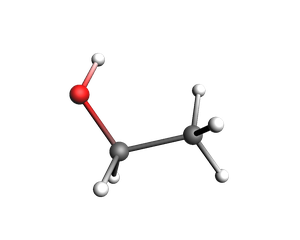
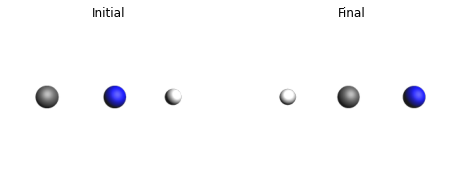
System accesses the unnamed main entry in ams.Systems. Programs supporting multiple systems use that mapping directly. Its dictionary keys become System block headers and guarantee unique names.
A real example is an NEB calculation, which needs an unnamed initial system and a system named final. The coordinates below are adapted from the AMS/NEB_HCN example shipped with AMS.
initial = ChemicalSystem(
    ["C", "N", "H"],
    [[0.000, 0.000, 0.000], [1.180, 0.000, 0.000], [2.196, 0.000, 0.000]],
)
final = ChemicalSystem(
    ["C", "N", "H"],
    [[0.000, 0.000, 0.000], [1.163, 0.000, 0.000], [-1.078, 0.000, 0.000]],
)

ams = AMS(Task="NEB")
ams.System = initial
ams.Systems["final"] = final
ams.NEB.Images = 9
ams.Engine = DFTB(Model="DFTB3", ResourcesDir="DFTB.org/3ob-3-1")

print(ams)
images = {
    "Initial": view(initial, direction="along_z", width=300, height=220),
    "Final": view(final, direction="along_z", width=300, height=220),
}
plot_image_grid(images, rows=1);
Task NEB
Engine DFTB
    Model DFTB3
    ResourcesDir DFTB.org/3ob-3-1
EndEngine
NEB
    Images 9
End
System
   Atoms
      C 0 0 0
      N 1.18 0 0
      H 2.196 0 0
   End
End
System final
   Atoms
      C 0 0 0
      N 1.163 0 0
      H -1.078 0 0
   End
End
Repeated keys and repeated blocks
Repeated input entries are ordinary lists. Here each string becomes one occurrence of the Distance key.
ams = AMS()
ams.Constraints.Distance = [
    "1 2 1.10",
    "2 3 1.40",
]
print(ams)
Constraints
    Distance 1 2 1.10
    Distance 2 3 1.40
End
Repeated blocks use a list of the corresponding nested block type. The Hybrid engine demonstrates both repeated Term blocks and repeated engine blocks with headers. An engine’s optional id is added to the block header after the engine type, e.g. Engine ADF [id].
lda = ADF(id="lda")
lda.XC.LDA = "VWN"
gga = ADF(id="gga")
gga.XC.GGA = "PBE"

hybrid = Hybrid()
hybrid.Engine = [lda, gga]
hybrid.Energy.Term = [
    Hybrid.EnergyBlock.TermBlock(EngineID="lda", Factor=0.25),
    Hybrid.EnergyBlock.TermBlock(EngineID="gga", Factor=0.75),
]

print(hybrid)
Engine Hybrid
    Energy
        Term
            EngineID lda
            Factor 0.25
        End
        Term
            EngineID gga
            Factor 0.75
        End
    End
    Engine ADF lda
        XC
            LDA VWN
        End
    EndEngine
    Engine ADF gga
        XC
            GGA PBE
        End
    EndEngine
EndEngine
Free blocks
An ordinary free block reads as list[str]. For convenient assignment, it also accepts one multiline string. Common indentation and empty framing lines from the Python literal are removed.
band = BAND()
band.Comment = """
    Generated with scm.inputs
    Every physical line stays in this free block.
"""

assert band.Comment == [
    "Generated with scm.inputs",
    "Every physical line stays in this free block.",
]
print(band)
Engine BAND
    Comment
        Generated with scm.inputs
        Every physical line stays in this free block.
    End
EndEngine
A repeated free block is a list of occurrences. Each occurrence may be a list of physical lines or a multiline string. This DFTB band path produces two separate Path ... End blocks.
dftb = DFTB()
dftb.Periodic.BandStructure.Enabled = True
dftb.Periodic.BandStructure.Automatic = False
dftb.Periodic.BZPath.Path = [
    """
    0.0 0.0 0.0 Gamma
    0.5 0.0 0.0 X
    """,
    """
    0.5 0.5 0.0 M
    0.0 0.0 0.0 Gamma
    """,
]

print(dftb)
Engine DFTB
    Periodic
        BandStructure
            Enabled True
            Automatic False
        End
        BZPath
            Path
                0.0 0.0 0.0 Gamma
                0.5 0.0 0.0 X
            End
            Path
                0.5 0.5 0.0 M
                0.0 0.0 0.0 Gamma
            End
        End
    End
EndEngine
Free blocks with headers
A free block that also needs a header uses the explicit HeaderedFreeBlock value. Its two fields map to the opening line and body lines. The wrapper deliberately is not list-like; access or modify the body through .lines.
qe = QuantumEspresso()
qe.K_Points = HeaderedFreeBlock(
    header="automatic",
    lines="4 4 4 0 0 0",
)

print(qe)
Engine QuantumEspresso
    K_Points automatic
        4 4 4 0 0 0
    End
EndEngine
Textual presence and unsetting
Python objects for fixed blocks are eagerly available, but Python existence is distinct from presence in serialized text. Use "Field" in model or model.is_present("Field") to query presence. Unknown or wrong-case names raise KeyError instead of silently returning False.
The del statement is the universal way to unset an input entry. It resets a field to a fresh default and removes its textual presence. This works for scalar keys, fixed blocks, and collections.
ams = AMS()
assert "GeometryOptimization" not in ams

ams.GeometryOptimization.OptimizeLattice = True
assert "GeometryOptimization" in ams
assert ams.is_present("GeometryOptimization")

del ams.GeometryOptimization
assert "GeometryOptimization" not in ams

# The reset block is fresh, typed, and immediately usable again.
ams.GeometryOptimization.Convergence.Quality = "Good"
Convert between text and models
to_input() returns complete AMS text for a root model. from_input() uses the existing AMS InputReader and resolves the concrete engine class from the Engine header. Canonical text emitted by a model round-trips exactly.
ams = AMS(Task="SinglePoint", Engine=DFTB(Model="GFN1-xTB"))
ams.Properties.Gradients = True

text_input = ams.to_input()
parsed_model = AMS.from_input(text_input)

assert parsed_model == ams
assert parsed_model.to_input() == text_input
assert isinstance(parsed_model.Engine, DFTB)
The same operation works for nested block types. A nested model consumes only its block body, without the outer block name and End. This is useful for validating or editing a fragment copied from an existing input file.
geoopt = AMS.GeometryOptimizationBlock.from_input("""
    OptimizeLattice Yes
    Convergence
        Quality Good
    End
""")

geoopt.Convergence.Gradients = (0.02, "eV/Angstrom")
print(geoopt)
OptimizeLattice True
Convergence
    Quality Good
    Gradients 0.0007349864374576985
End
InputReader intentionally normalizes arbitrary human-authored text. For example, it resolves includes, environment variables, ranges, units, and insignificant free-block indentation. Therefore text -> model -> text preserves meaning but is not promised to preserve every source character. The reverse model -> text -> model round-trip is exact.
Generate editable Python code
to_python() emits Python source that reconstructs a model with ordinary typed assignments. It returns the import block and the statements separately, so the body can go inside a function of your own while the imports stay at the top of the module. This is useful when turning existing text input into an editable script: unlike a nested dictionary, the generated fields retain editor completion and static checks. Use variable_name to choose the name of the root variable. Like to_input(), embedded chemical systems use human-readable Angstrom coordinates by default; pass lossless=True when exact internal values must round-trip.
from scm.inputs import AMS

text_input = """
Task GeometryOptimization

GeometryOptimization
    MaxIterations 100
End

Engine DFTB
    Model GFN1-xTB
EndEngine
"""

ams = AMS.from_input(text_input)
imports, body = ams.to_python(variable_name="ams")
print(imports)
print()
print(body)
from scm.inputs import AMS, DFTB

ams = AMS()
ams.Task = 'GeometryOptimization'

dftb = DFTB()
dftb.Model = 'GFN1-xTB'

ams.Engine = dftb
ams.GeometryOptimization.MaxIterations = 100
Reuse and combine input
Typed models support the familiar plams.Settings composition operations. left + right, left.merge(right), left.soft_update(right), and left += right keep values already present on the left. left.update(right) overwrites conflicts with present values from the right. Fixed blocks merge recursively, while repeated collections and engines are treated as complete values.
geoopt = AMS(Task="GeometryOptimization")
geoopt.GeometryOptimization.Convergence.Quality = "Good"

props = AMS()
props.Properties.NormalModes = True

combined = geoopt + props
assert "GeometryOptimization" in combined
assert "Properties" in combined
print(combined)
Task GeometryOptimization
Properties
    NormalModes True
End
GeometryOptimization
    Convergence
        Quality Good
    End
End
Compared with PLAMS Settings
PLAMS Settings is the classic, still-supported way to prepare AMS input. Its unlimited flexibility can be useful, but it also means that a typo or invalid value may survive until much later. scm.inputs is the safer, discoverable choice for documented AMS input whenever a typed model is available.
PLAMS |
|
|---|---|
Generic, case-insensitive nested mapping |
Program-specific, case-sensitive model matching the manual |
Any attribute can silently become a new branch |
Editors complete known fields; unknown fields are rejected |
Values are generally serialized without checking |
Types, choices, ranges, and units are validated where defined |
Driver and engine are conventions such as |
Driver and engine are explicit |
|
Headers and free lines have explicit fields or natural lists/multiline strings |
False and |
Explicitly assigned defaults, including |
The generic container does not define one program’s complete input schema |
Every model and nested block supports schema-aware |
Text conversion produces generic |
|
Settings remains useful as a general-purpose container for arbitrary workflow data. When an object represents AMS key/block input, prefer scm.inputs for editor support, immediate validation, and direct text conversion.
The experimental PISA-generated scm.input_classes API was the early prototype from which scm.inputs grew. It has now been retired and removed in favor of the directly authored and fully round-trippable scm.inputs models.
See also
Python Script
#!/usr/bin/env python
# coding: utf-8

# ## Why typed input models?
#
# The AMS manuals describe input as keys organized in blocks. The classes in `scm.inputs` mirror that familiar text structure: every program has its own Pydantic model, and legal Python field names use the same spelling as the corresponding AMS key or block.
#
# Unlike a generic nested dictionary, a typed model tells your editor which blocks and keys exist, offers completion for allowed values, shows keyword documentation on hover, and validates assignments. At the same time, it remains easy to print ordinary AMS text or parse text back into a model.
#
# This example is only about **preparing input**: it does not run jobs.

from scm.base import ChemicalSystem
from scm.inputs import ADF, AMS, BAND, DFTB, HeaderedFreeBlock, Hybrid, QuantumEspresso
from scm.plams import plot_image_grid, view


# ## Keys, fixed blocks, and engines
#
# Create an `AMS` model for the driver input. Fixed blocks such as `GeometryOptimization`, `Convergence`, and `Properties` are always available for natural chained access, but an untouched block is not written to the text input.
#
# The engine is an instance of its concrete model. After assigning `DFTB`, an editor such as VS Code with Pylance knows that `input_model.Engine` is a `DFTB` object and completes DFTB-specific fields.

ams = AMS()
ams.Task = "GeometryOptimization"
ams.GeometryOptimization.Convergence.Gradients = 1.0e-4
ams.Properties.NormalModes = True

ams.Engine = DFTB()
ams.Engine.Model = "GFN1-xTB"

print(ams.to_input())


# The generated text contains only fields that were explicitly set, or blocks containing such fields. Definition order is preserved. `str(input_model)` is equivalent to `input_model.to_input()`, so a plain `print(input_model)` would have worked too. For specialized cases, `input_model.to_input(only={"GeometryOptimization"})` serializes only the selected top-level fields.
#
# ### IDE assistance and validation
#
# Python field names are case-sensitive and preserve the spelling from the AMS manual. This is intentional: moving between Python and text does not require mentally translating names. The assignments in the next cell are deliberately wrong. A capable editor marks them before execution, and Pydantic rejects the same mistakes at runtime.

ams = AMS()

try:
    ams.Taks = "GeometryOptimization"  # Misspelled field name
except Exception as error:
    print(error)

try:
    ams.Task = "Optimize"  # Not an allowed Task value
except Exception as error:
    print(error)

dftb = DFTB()
try:
    dftb.Model = 12  # Model expects a string choice
except Exception as error:
    print(error)


# ### Supply quantities in a convenient unit
#
# A plain number uses the keyword's storage unit. `get_unit()` exposes that metadata at runtime. You may instead assign a `(value, unit)` pair: the model converts it immediately and continues exposing an ordinary `float` when the field is read.

ams = AMS()
convergence = ams.GeometryOptimization.Convergence

print(f"Gradients storage unit: {convergence.get_unit('Gradients')}")
convergence.Gradients = (0.05, "eV/Angstrom")

assert isinstance(convergence.Gradients, float)
print(ams)


# ### Assign a block body as text
#
# Sometimes text is the clearest way to paste or generate a complete block. Fixed block fields accept either their typed block object or an AMS text block body. Do not include the outer `GeometryOptimization ... End` delimiters: the destination field already identifies the block. After conversion, the value is still a fully typed `GeometryOptimizationBlock`.

ams = AMS()
ams.GeometryOptimization = """
    OptimizeLattice No
    Convergence
        Quality Good
    End
"""

assert isinstance(ams.GeometryOptimization, AMS.GeometryOptimizationBlock)
ams.GeometryOptimization.Convergence.Energy = (0.2, "eV")
print(ams)


# ## Chemical systems
#
# The `System` block is represented by the dedicated `ChemicalSystem` class rather than by another hierarchy of input keys. For the usual single-system input, assign it through the convenient capitalized `System` property.

ams = AMS()
ams.System = ChemicalSystem.from_smiles("CCO")

print(ams)
view(ams.System, direction="along_pca3", width=300, height=240, picture_path="picture1.png")


# `System` accesses the unnamed main entry in `ams.Systems`. Programs supporting multiple systems use that mapping directly. Its dictionary keys become `System` block headers and guarantee unique names.
#
# A real example is an NEB calculation, which needs an unnamed initial system and a system named `final`. The coordinates below are adapted from the `AMS/NEB_HCN` example shipped with AMS.

initial = ChemicalSystem(
    ["C", "N", "H"],
    [[0.000, 0.000, 0.000], [1.180, 0.000, 0.000], [2.196, 0.000, 0.000]],
)
final = ChemicalSystem(
    ["C", "N", "H"],
    [[0.000, 0.000, 0.000], [1.163, 0.000, 0.000], [-1.078, 0.000, 0.000]],
)

ams = AMS(Task="NEB")
ams.System = initial
ams.Systems["final"] = final
ams.NEB.Images = 9
ams.Engine = DFTB(Model="DFTB3", ResourcesDir="DFTB.org/3ob-3-1")

print(ams)
images = {
    "Initial": view(initial, direction="along_z", width=300, height=220),
    "Final": view(final, direction="along_z", width=300, height=220),
}
plot_image_grid(images, rows=1, save_path="picture2.png");


# ## Repeated keys and repeated blocks
#
# Repeated input entries are ordinary lists. Here each string becomes one occurrence of the `Distance` key.

ams = AMS()
ams.Constraints.Distance = [
    "1 2 1.10",
    "2 3 1.40",
]
print(ams)


# Repeated blocks use a list of the corresponding nested block type. The Hybrid engine demonstrates both repeated `Term` blocks and repeated engine blocks with headers. An engine's optional `id` is added to the block header after the engine type, e.g. `Engine ADF [id]`.

lda = ADF(id="lda")
lda.XC.LDA = "VWN"
gga = ADF(id="gga")
gga.XC.GGA = "PBE"

hybrid = Hybrid()
hybrid.Engine = [lda, gga]
hybrid.Energy.Term = [
    Hybrid.EnergyBlock.TermBlock(EngineID="lda", Factor=0.25),
    Hybrid.EnergyBlock.TermBlock(EngineID="gga", Factor=0.75),
]

print(hybrid)


# ## Free blocks
#
# An ordinary free block reads as `list[str]`. For convenient assignment, it also accepts one multiline string. Common indentation and empty framing lines from the Python literal are removed.

band = BAND()
band.Comment = """
    Generated with scm.inputs
    Every physical line stays in this free block.
"""

assert band.Comment == [
    "Generated with scm.inputs",
    "Every physical line stays in this free block.",
]
print(band)


# A repeated free block is a list of occurrences. Each occurrence may be a list of physical lines or a multiline string. This DFTB band path produces two separate `Path ... End` blocks.

dftb = DFTB()
dftb.Periodic.BandStructure.Enabled = True
dftb.Periodic.BandStructure.Automatic = False
dftb.Periodic.BZPath.Path = [
    """
    0.0 0.0 0.0 Gamma
    0.5 0.0 0.0 X
    """,
    """
    0.5 0.5 0.0 M
    0.0 0.0 0.0 Gamma
    """,
]

print(dftb)


# ### Free blocks with headers
#
# A free block that also needs a header uses the explicit `HeaderedFreeBlock` value. Its two fields map to the opening line and body lines. The wrapper deliberately is not list-like; access or modify the body through `.lines`.

qe = QuantumEspresso()
qe.K_Points = HeaderedFreeBlock(
    header="automatic",
    lines="4 4 4 0 0 0",
)

print(qe)


# ## Textual presence and unsetting
#
# Python objects for fixed blocks are eagerly available, but Python existence is distinct from presence in serialized text. Use `"Field" in model` or `model.is_present("Field")` to query presence. Unknown or wrong-case names raise `KeyError` instead of silently returning `False`.
#
# The `del` statement is the universal way to unset an input entry. It resets a field to a fresh default and removes its textual presence. This works for scalar keys, fixed blocks, and collections.

ams = AMS()
assert "GeometryOptimization" not in ams

ams.GeometryOptimization.OptimizeLattice = True
assert "GeometryOptimization" in ams
assert ams.is_present("GeometryOptimization")

del ams.GeometryOptimization
assert "GeometryOptimization" not in ams

# The reset block is fresh, typed, and immediately usable again.
ams.GeometryOptimization.Convergence.Quality = "Good"


# ## Convert between text and models
#
# `to_input()` returns complete AMS text for a root model. `from_input()` uses the existing AMS InputReader and resolves the concrete engine class from the `Engine` header. Canonical text emitted by a model round-trips exactly.

ams = AMS(Task="SinglePoint", Engine=DFTB(Model="GFN1-xTB"))
ams.Properties.Gradients = True

text_input = ams.to_input()
parsed_model = AMS.from_input(text_input)

assert parsed_model == ams
assert parsed_model.to_input() == text_input
assert isinstance(parsed_model.Engine, DFTB)


# The same operation works for nested block types. A nested model consumes only its block body, without the outer block name and `End`. This is useful for validating or editing a fragment copied from an existing input file.

geoopt = AMS.GeometryOptimizationBlock.from_input("""
    OptimizeLattice Yes
    Convergence
        Quality Good
    End
""")

geoopt.Convergence.Gradients = (0.02, "eV/Angstrom")
print(geoopt)


# InputReader intentionally normalizes arbitrary human-authored text. For example, it resolves includes, environment variables, ranges, units, and insignificant free-block indentation. Therefore `text -> model -> text` preserves meaning but is not promised to preserve every source character. The reverse `model -> text -> model` round-trip is exact.

# ### Generate editable Python code
# `to_python()` emits Python source that reconstructs a model with ordinary typed assignments. It returns the import block and the statements separately, so the body can go inside a function of your own while the imports stay at the top of the module. This is useful when turning existing text input into an editable script: unlike a nested dictionary, the generated fields retain editor completion and static checks. Use `variable_name` to choose the name of the root variable. Like `to_input()`, embedded chemical systems use human-readable Angstrom coordinates by default; pass `lossless=True` when exact internal values must round-trip.

from scm.inputs import AMS

text_input = """
Task GeometryOptimization

GeometryOptimization
    MaxIterations 100
End

Engine DFTB
    Model GFN1-xTB
EndEngine
"""

ams = AMS.from_input(text_input)
imports, body = ams.to_python(variable_name="ams")
print(imports)
print()
print(body)


# ## Reuse and combine input
#
# Typed models support the familiar `plams.Settings` composition operations. `left + right`, `left.merge(right)`, `left.soft_update(right)`, and `left += right` keep values already present on the left. `left.update(right)` overwrites conflicts with present values from the right. Fixed blocks merge recursively, while repeated collections and engines are treated as complete values.

geoopt = AMS(Task="GeometryOptimization")
geoopt.GeometryOptimization.Convergence.Quality = "Good"

props = AMS()
props.Properties.NormalModes = True

combined = geoopt + props
assert "GeometryOptimization" in combined
assert "Properties" in combined
print(combined)


# ## Compared with PLAMS Settings
#
# PLAMS `Settings` is the classic, still-supported way to prepare AMS input. Its unlimited flexibility can be useful, but it also means that a typo or invalid value may survive until much later. `scm.inputs` is the safer, discoverable choice for documented AMS input whenever a typed model is available.
#
# | PLAMS `Settings` | `scm.inputs` |
# | --- | --- |
# | Generic, case-insensitive nested mapping | Program-specific, case-sensitive model matching the manual |
# | Any attribute can silently become a new branch | Editors complete known fields; unknown fields are rejected |
# | Values are generally serialized without checking | Types, choices, ranges, and units are validated where defined |
# | Driver and engine are conventions such as `s.input.ams` and `s.input.DFTB` | Driver and engine are explicit `AMS` and `DFTB` objects |
# | `_h` represents a header and `_1`, `_2`, ... represent free lines | Headers and free lines have explicit fields or natural lists/multiline strings |
# | False and `None` are omitted by the serializer | Explicitly assigned defaults, including `False`, retain textual presence |
# | The generic container does not define one program's complete input schema | Every model and nested block supports schema-aware `to_input()` and `from_input()` |
# | Text conversion produces generic `Settings` assignments | `to_python()` produces editable, typed model assignments that editors can check |
#
# `Settings` remains useful as a general-purpose container for arbitrary workflow data. When an object represents AMS key/block input, prefer `scm.inputs` for editor support, immediate validation, and direct text conversion.
#
# The experimental PISA-generated `scm.input_classes` API was the early prototype from which `scm.inputs` grew. It has now been retired and removed in favor of the directly authored and fully round-trippable `scm.inputs` models.