
Active Learning: Continue with a New System
Continue a Simple Active Learning workflow from a previous trained model and data set, but switch to a new molecule or different simulation settings.
Initialization
from scm.simple_active_learning import SimpleActiveLearningJob
import scm.plams as plams
import matplotlib.pyplot as plt
import os

plams.init(folder="plams_workdir_continuation")
PLAMS working folder: /path/to/plams_workdir_continuation.002
Set the correct path to the previous Simple Active Learning job. The path should be a directory containing the file “simple_active_learning.rkf”
# replace the path with your own path !
previous_sal_job_path = os.path.expandvars(
    "$AMSHOME/examples/SAL/Output/SingleMolecule/plams_workdir/sal"
)
previous_sal_job = SimpleActiveLearningJob.load_external(previous_sal_job_path)
previous_params_path = previous_sal_job.results.get_params_results_directory()
Initial system, reference engine settings, MD settings
These settings were explained in the first tutorial.
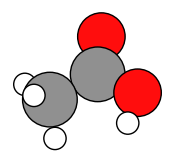
Here we use a new molecule (acetic acid), but we could also have changed the temperature of the MD simulation, or any other setting.
mol = plams.from_smiles("CC(O)=O")
for at in mol:
    at.properties = {}
mol = plams.preoptimize(mol)
plams.plot_molecule(mol)
ref_s = plams.Settings()
ref_s.input.ForceField.Type = "UFF"
ref_s.runscript.nproc = 1
md_s = plams.AMSNVTJob(temperature=300, timestep=0.5, nsteps=10000).settings
ParAMS ML training settings
Here we set LoadModel = previous_params_path to load the model from the previous job.
This will also automatically load the previous training and validation data, unless it’s disabled in the Active Learning settings.
ml_s = plams.Settings()
ml_s.input.ams.MachineLearning.Backend = "M3GNet"
ml_s.input.ams.MachineLearning.CommitteeSize = 1
ml_s.input.ams.MachineLearning.LoadModel = os.path.abspath(previous_params_path)
ml_s.input.ams.MachineLearning.MaxEpochs = 200
Active Learning settings
Here we use the same settings as before, but if the system is similar (or even the same!) as before, you may consider increasing the Start to let the system evolve a bit more before the first reference calculation.
You can also set theActiveLearning.InitialReferenceData.Load.Directory option instead of the MachineLearning.LoadModel option to load the data from the previous run. See the documentation for details about the difference between the two options.
al_s = plams.Settings()
al_s.input.ams.ActiveLearning.Steps.Type = "Geometric"
al_s.input.ams.ActiveLearning.Steps.Geometric.Start = 10  # 10 MD frames
al_s.input.ams.ActiveLearning.Steps.Geometric.NumSteps = 5  # 5 AL steps
# alternative to ml_s.input.ams.MacineLearning.LoadModel:
# al_s.input.ams.ActiveLearning.InitialReferenceData.Load.Directory = os.path.abspath(previous_params_path)
al_s.input.ams.ActiveLearning.InitialReferenceData.Generate.ReferenceMD.Enabled = "Yes"
Simple Active Learning job
We can run the active learning as before.
Note that the training jobs now take longer than before since the training and validation sets are bigger.
settings = ref_s + md_s + ml_s + al_s
job = SimpleActiveLearningJob(settings=settings, molecule=mol, name="sal")
job.run(watch=True);
[05.02|14:47:09] JOB sal STARTED
[05.02|14:47:09] JOB sal RUNNING
[05.02|14:47:10] Simple Active Learning 2023.205,  Nodes: 1, Procs: 1
[05.02|14:47:13] Composition of main system: C2H4O2
[05.02|14:47:13] All REFERENCE calculations will be performed with the following ForceField engine:
... output trimmed ....
[05.02|14:56:14] Active learning finished!
[05.02|14:56:14] Rerunning the simulation with the final parameters...
[05.02|14:57:51] Goodbye!
[05.02|14:57:51] JOB sal FINISHED
[05.02|14:57:51] JOB sal SUCCESSFUL


<scm.params.plams.simple_active_learning_job.SimpleActiveLearningResults at 0x7f3998ddc1f0>
See also
Python Script
#!/usr/bin/env python
# coding: utf-8

# ## Initialization

from scm.simple_active_learning import SimpleActiveLearningJob
import scm.plams as plams
import matplotlib.pyplot as plt
import os

plams.init(folder="plams_workdir_continuation")


# Set the correct path to the previous Simple Active Learning job. The path should be a directory containing the file "simple_active_learning.rkf"

# replace the path with your own path !
previous_sal_job_path = os.path.expandvars("$AMSHOME/examples/SAL/Output/SingleMolecule/plams_workdir/sal")
previous_sal_job = SimpleActiveLearningJob.load_external(previous_sal_job_path)
previous_params_path = previous_sal_job.results.get_params_results_directory()


# ## Initial system, reference engine settings, MD settings
#
# These settings were explained in the first tutorial.
#
# Here we use a new molecule (acetic acid), but we could also have changed the temperature of the MD simulation, or any other setting.

mol = plams.from_smiles("CC(O)=O")
for at in mol:
    at.properties = {}
mol = plams.preoptimize(mol)
plams.plot_molecule(mol)


ref_s = plams.Settings()
ref_s.input.ForceField.Type = "UFF"
ref_s.runscript.nproc = 1


md_s = plams.AMSNVTJob(temperature=300, timestep=0.5, nsteps=10000).settings


# ## ParAMS ML training settings
# Here we set ``LoadModel = previous_params_path`` to load the model from the previous job.
#
# This will also automatically load the previous training and validation data, unless it's disabled in the Active Learning settings.

ml_s = plams.Settings()
ml_s.input.ams.MachineLearning.Backend = "M3GNet"
ml_s.input.ams.MachineLearning.CommitteeSize = 1
ml_s.input.ams.MachineLearning.LoadModel = os.path.abspath(previous_params_path)
ml_s.input.ams.MachineLearning.MaxEpochs = 200


# ## Active Learning settings
#
# Here we use the same settings as before, but if the system is similar (or even the same!) as before, you may consider increasing the ``Start`` to let the system evolve a bit more before the first reference calculation.
#
# You can also set the``ActiveLearning.InitialReferenceData.Load.Directory`` option instead of the ``MachineLearning.LoadModel`` option to load the data from the previous run. See the documentation for details about the difference between the two options.

al_s = plams.Settings()
al_s.input.ams.ActiveLearning.Steps.Type = "Geometric"
al_s.input.ams.ActiveLearning.Steps.Geometric.Start = 10  # 10 MD frames
al_s.input.ams.ActiveLearning.Steps.Geometric.NumSteps = 5  # 5 AL steps
# alternative to ml_s.input.ams.MacineLearning.LoadModel:
# al_s.input.ams.ActiveLearning.InitialReferenceData.Load.Directory = os.path.abspath(previous_params_path)
al_s.input.ams.ActiveLearning.InitialReferenceData.Generate.ReferenceMD.Enabled = "Yes"


# ## Simple Active Learning job
#
# We can run the active learning as before.
#
# Note that the training jobs now take longer than before since the training and validation sets are bigger.

settings = ref_s + md_s + ml_s + al_s
job = SimpleActiveLearningJob(settings=settings, molecule=mol, name="sal")
job.run(watch=True)