
Getting Started: Geometry Optimization of Water
If you are new to PLAMS, also see the Getting started PLAMS tutorial.
This example shows a minimal geometry-optimization workflow for water, followed by vibrational analysis and simple result extraction from the finished job.
Important: This example requires AMS2026 or later. For AMS2025 and older, see the respective PLAMS documentation.
Optimize a water molecule with DFTB
This example shows how to perform a geometry optimization of a water molecule and compute the vibrational normal modes using GFN1-xTB.
If you do not have a DFTB license, remove the line with DFTB settings and instead set settings.input.ForceField.Type = 'UFF'
Initial imports
from scm.base import ChemicalSystem, Units
from scm.plams import AMSJob, Settings, view
Initial structure
# You could also load the geometry from an xyz file:
# molecule = ChemicalSystem.from_xyz('path/my_molecule.xyz')
# or generate a molecule from SMILES:
# molecule = ChemicalSystem.from_smiles('O')
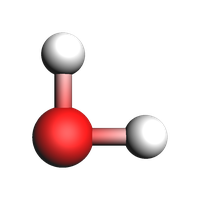
molecule = ChemicalSystem(
    """
System
  Atoms
    O 0.0 0.0 0.0
    H 1.0 0.0 0.0
    H 0.0 1.0 0.0
  End
End
"""
)
view(molecule, guess_bonds=True, width=200, height=200)
Calculation settings
The calculation settings are stored in a Settings object, which is a type of nested dictionary.
settings = Settings()
settings.input.ams.Task = "GeometryOptimization"
settings.input.ams.Properties.NormalModes = "Yes"
settings.input.DFTB.Model = "GFN1-xTB"
# settings.input.ForceField.Type = 'UFF' # set this instead of DFTB if you do not have a DFTB license. You will then not be able to extract the HOMO and LUMO energies.
Create an AMSJob
job = AMSJob(molecule=molecule, settings=settings, name="water_optimization")
You can check the input to AMS by calling the get_input() method:
print("-- input to the job --")
print(job.get_input())
print("-- end of input --")
-- input to the job --
Properties
  NormalModes Yes
End

Task GeometryOptimization

System
  Atoms
              O       0.0000000000       0.0000000000       0.0000000000
              H       1.0000000000       0.0000000000       0.0000000000
              H       0.0000000000       1.0000000000       0.0000000000
  End
End

Engine DFTB
  Model GFN1-xTB
EndEngine


-- end of input --
Run the job
job.run();
[19.03|15:41:59] JOB water_optimization STARTED
[19.03|15:41:59] JOB water_optimization RUNNING
[19.03|15:42:01] JOB water_optimization FINISHED
[19.03|15:42:01] JOB water_optimization SUCCESSFUL
Main results files: ams.rkf and dftb.rkf
The paths to the main binary results files ams.rkf and dftb.rkf can be retrieved as follows:
print(job.results.rkfpath(file="ams"))
print(job.results.rkfpath(file="engine"))
/Users/ormrodmorley/Documents/code/ams/amshome/userdoc/PythonExamples/water-optimization/plams_workdir/water_optimization/ams.rkf
/Users/ormrodmorley/Documents/code/ams/amshome/userdoc/PythonExamples/water-optimization/plams_workdir/water_optimization/dftb.rkf
Optimized coordinates
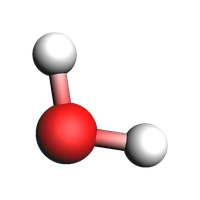
optimized_molecule = job.results.get_main_system()

print("Optimized coordinates")
print("---------------------")
print(optimized_molecule)
print("---------------------")
Optimized coordinates
---------------------
  Atoms:
    1         O       0.066921       0.066921       0.000000
    2         H       1.012042      -0.078963       0.000000
    3         H      -0.078963       1.012042       0.000000

---------------------
view(optimized_molecule, guess_bonds=True, width=200, height=200)
Optimized bond lengths and angle
Unlike the AMS input file and GUI, where the index of the first element is 1, the index of the first atom in the ChemicalSystem object is 0.
bond_length = optimized_molecule.get_distance(0, 1)
print("O-H bond length: {:.3f} angstrom".format(bond_length))
O-H bond length: 0.956 angstrom
bond_angle = optimized_molecule.get_angle(1, 0, 2, unit="degree")
print("Bond angle  : {:.1f} degrees".format(bond_angle))
Bond angle : 107.5 degrees
Calculation timing
timings = job.results.get_timings()

print("Timings")
print("-------")
for key, value in timings.items():
    print(f"{key:<20s}: {value:.3f} seconds")
print("-------")
Timings
-------
elapsed             : 1.261 seconds
system              : 0.064 seconds
cpu                 : 0.924 seconds
-------
Energy
energy = job.results.get_energy(unit="kcal/mol")

print("Energy      : {:.3f} kcal/mol".format(energy))
Energy : -3618.400 kcal/mol
Vibrational frequencies
frequencies = job.results.get_frequencies(unit="cm^-1")

print("Frequencies")
print("-----------")
for freq in frequencies:
    print(f"{freq:.3f} cm^-1")
print("-----------")
Frequencies
-----------
1427.924 cm^-1
3674.507 cm^-1
3785.960 cm^-1
-----------
Dipole moment
import numpy as np

try:
    dipole_moment = np.linalg.norm(np.array(job.results.get_dipolemoment()))
    dipole_moment *= Units.conversion_factor("au", "debye")
    print("Dipole moment: {:.3f} debye".format(dipole_moment))
except KeyError:
    print("Couldn't extract the dipole moment")
Dipole moment: 1.830 debye
HOMO, LUMO, and HOMO-LUMO gap
Note: The methods for extracting HOMO, LUMO, and HOMO-LUMO gap only exist in AMS2023 and later.
try:
    homo = job.results.get_homo_energies(unit="eV")[0]
    lumo = job.results.get_lumo_energies(unit="eV")[0]
    homo_lumo_gap = job.results.get_smallest_homo_lumo_gap(unit="eV")

    print("HOMO        : {:.3f} eV".format(homo))
    print("LUMO        : {:.3f} eV".format(lumo))
    print("HOMO-LUMO gap : {:.3f} eV".format(homo_lumo_gap))
except KeyError:
    print("Couldn't extract the HOMO and LUMO.")
HOMO        : -13.593 eV
LUMO        : -4.206 eV
HOMO-LUMO gap : 9.387 eV
Read results directly from binary .rkf files
You can also read results directly from the binary .rkf files. Use the “expert mode” of the KFbrowser program that comes with AMS to find out which section and variable to read.
Below, we show how to extract the AMSResults%Energy variable from the dftb.rkf file. This is the same number that was extracted previously using the job.results.get_energy() method.
energy = job.results.readrkf("AMSResults", "Energy", file="engine")
print(f"Energy from the engine .rkf file (in hartree): {energy}")
Energy from the engine .rkf file (in hartree): -5.766288141081021
See also
Python Script
#!/usr/bin/env python
# coding: utf-8

# ## Optimize a water molecule with DFTB
#
# This example shows how to perform a geometry optimization of a water molecule and compute
# the vibrational normal modes using GFN1-xTB.
#
# If you do not have
# a DFTB license, remove the line with DFTB settings and instead set
# ``settings.input.ForceField.Type = 'UFF'``

# ## Initial imports

from scm.base import ChemicalSystem, Units
from scm.plams import AMSJob, Settings, view


# ## Initial structure

# You could also load the geometry from an xyz file:
# molecule = ChemicalSystem.from_xyz('path/my_molecule.xyz')
# or generate a molecule from SMILES:
# molecule = ChemicalSystem.from_smiles('O')
molecule = ChemicalSystem(
    """
System
  Atoms
    O 0.0 0.0 0.0
    H 1.0 0.0 0.0
    H 0.0 1.0 0.0
  End
End
"""
)


view(molecule, guess_bonds=True, width=200, height=200, picture_path="picture1.png")


# ## Calculation settings
#
# The calculation settings are stored in a ``Settings`` object, which is a type of nested dictionary.

settings = Settings()
settings.input.ams.Task = "GeometryOptimization"
settings.input.ams.Properties.NormalModes = "Yes"
settings.input.DFTB.Model = "GFN1-xTB"
# settings.input.ForceField.Type = 'UFF' # set this instead of DFTB if you do not have a DFTB license. You will then not be able to extract the HOMO and LUMO energies.


# ## Create an AMSJob

job = AMSJob(molecule=molecule, settings=settings, name="water_optimization")


# You can check the input to AMS by calling the ``get_input()`` method:

print("-- input to the job --")
print(job.get_input())
print("-- end of input --")


# ## Run the job

job.run();


# ## Main results files: ams.rkf and dftb.rkf
#
# The paths to the main binary results files ``ams.rkf`` and ``dftb.rkf`` can be retrieved as follows:

print(job.results.rkfpath(file="ams"))
print(job.results.rkfpath(file="engine"))


# ## Optimized coordinates

optimized_molecule = job.results.get_main_system()

print("Optimized coordinates")
print("---------------------")
print(optimized_molecule)
print("---------------------")


view(optimized_molecule, guess_bonds=True, width=200, height=200, picture_path="picture2.png")


# ## Optimized bond lengths and angle

# Unlike the AMS input file and GUI, where the index of the first element is 1,
# the index of the first atom in the ChemicalSystem object is 0.

bond_length = optimized_molecule.get_distance(0, 1)
print("O-H bond length: {:.3f} angstrom".format(bond_length))


bond_angle = optimized_molecule.get_angle(1, 0, 2, unit="degree")
print("Bond angle  : {:.1f} degrees".format(bond_angle))


# ## Calculation timing

timings = job.results.get_timings()

print("Timings")
print("-------")
for key, value in timings.items():
    print(f"{key:<20s}: {value:.3f} seconds")
print("-------")


# ## Energy

energy = job.results.get_energy(unit="kcal/mol")

print("Energy      : {:.3f} kcal/mol".format(energy))


# ## Vibrational frequencies

frequencies = job.results.get_frequencies(unit="cm^-1")

print("Frequencies")
print("-----------")
for freq in frequencies:
    print(f"{freq:.3f} cm^-1")
print("-----------")


# ##  Dipole moment

import numpy as np

try:
    dipole_moment = np.linalg.norm(np.array(job.results.get_dipolemoment()))
    dipole_moment *= Units.conversion_factor("au", "debye")
    print("Dipole moment: {:.3f} debye".format(dipole_moment))
except KeyError:
    print("Couldn't extract the dipole moment")


# ## HOMO, LUMO, and HOMO-LUMO gap
#
# Note: The methods for extracting HOMO, LUMO, and HOMO-LUMO gap only exist in AMS2023 and later.

try:
    homo = job.results.get_homo_energies(unit="eV")[0]
    lumo = job.results.get_lumo_energies(unit="eV")[0]
    homo_lumo_gap = job.results.get_smallest_homo_lumo_gap(unit="eV")

    print("HOMO        : {:.3f} eV".format(homo))
    print("LUMO        : {:.3f} eV".format(lumo))
    print("HOMO-LUMO gap : {:.3f} eV".format(homo_lumo_gap))
except KeyError:
    print("Couldn't extract the HOMO and LUMO.")


# ## Read results directly from binary .rkf files
#
# You can also read results directly from the binary .rkf files. Use the "expert mode" of the KFbrowser program that comes with AMS to find out which section and variable to read.
#
# Below, we show how to extract the ``AMSResults%Energy`` variable from the dftb.rkf file. This is the same number that was extracted previously using the ``job.results.get_energy()`` method.

energy = job.results.readrkf("AMSResults", "Energy", file="engine")
print(f"Energy from the engine .rkf file (in hartree): {energy}")